Mutations
/businessnxtapi/schema/mutations
section
Guides you on using mutations for inserts, updates, deletes, and running tasks within a GraphQL schema.
2024-09-24T15:57:29+02:00
# Mutations
Guides you on using mutations for inserts, updates, deletes, and running tasks within a GraphQL schema.
You can perform inserts, updates, and deletes on all the company and system tables. This is possible with the `mutation` operation. Additional mutation operations include running processings and reports as well as executing queries asynchronously.
Mutations are available with the `mutation` field at the top of the GraphQL schema, as shown in the following image:
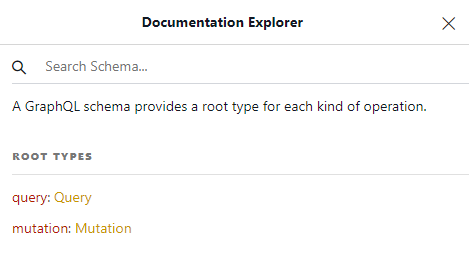
The Mutation Type
/businessnxtapi/schema/mutations/mutation
page
Root Mutation type defines operations on company and system tables, enabling create, update, delete, and asynchronous queries.
2024-09-24T15:57:29+02:00
# The Mutation Type
Root Mutation type defines operations on company and system tables, enabling create, update, delete, and asynchronous queries.
The `Mutation` type is the root of all types that define table objects used in these operations, in the same way the `Query` type was the root for all types used in reading operations. In fact, `Mutation` and `Query` are very similar, as `Mutation` contains the following fields:
| Field | Description |
| ----- | ----------- |
| `useCompany` | Provides access to operations on the company tables. |
| `useCustomer` | Provides access to operations on the system tables. |
| `asyncQuery` | A field for executing another GraphQL query asynchronously. See [Async queries](../async.md). |

The type of the `useCompany` field is `Mutation_UseCompany`. This type contains a field for each of the create, update, and delete operation for every company table.
Similarly, the type of the `useCustomer` field is `Mutation_UseCustomer`. This type contains a field for each of the create, update, and delete operation for every system table.
You can see the two types, `Mutation_UseCustomer` and `Mutation_UseCompany`, side-by-side in the following table:
| System table | Company table |
| ----------- | --- |
|  |  |
Insert operations
/businessnxtapi/schema/mutations/inserts
page
GraphQL Insert Operations - Define _create mutation fields, arguments, type structure, and example queries, emphasizing field order and inserting between records.
2025-12-11T10:17:55+02:00
# Insert operations
GraphQL Insert Operations - Define _create mutation fields, arguments, type structure, and example queries, emphasizing field order and inserting between records.
Insert operations are available through a field having the name of the form `_create` of a type having the name of the form `__Result`. For instance, for the `Associate` table, the field is called `associate_create` and its type is `Mutation_UseCompany_Associate_Result`.
The form of this operation is the following:
```graphql
associate_create(values: [Associate_Input!]!,
insertAtRow: FilterExpression_Order,
insertPosition: InsertPosition): Mutation_UseCompany_Associate_Result
```
The `_create` field has several arguments:
- one mandatory called `values` which is a non-nullable array of objects of type `_Input`. For instance, for the `Associate` table, the input type is `Associate_Input`.
- one optional called `insertAtRow` which is a filter expression that identifies the row where the new records should be inserted.
- one optional called `insertPosition` which is an enum of type `InsertPosition` that can have the values `BEFORE` and `AFTER`, which is used in conjunction with the `insertAtRow` argument to define the direction of the insertion of the new records.
- one optional called `suggest` which is object of type `Suggest__Input`. For instance, for the `Associate` table, this input type is called `Suggest_Associate_Input`.
> [!WARNING]
>
> The `suggest` argument for requesting suggested values is now deprecated.
The input types for the `values` argument expose all the columns of the table, except for:
- the primary key column (which is automatically incremented)
- in-memory columns
- utility columns `createdDate` (SQL name `CreDt`), `createdTime` (SQL name `CreTm`), `createdByUser` (SQL name `CreUsr`), `changedDate` (SQL name `ChDt`), `changedTime` (SQL name `ChTm`), and `changedByUser` (SQL name `ChUsr`), which are present in every table.
If a table has more than one column as primary keys, then all but the last of these primary key columns must be filled in. The last primary key column is automatically incremented but the others must be explicitly supplied. These are foreign keys to other tables and the records they point to must exist for the operation to succeed. In this case, the type name has the form `_Insert_Input`.
The following image shows a snippet of the `Associate_Input` type from the GraphiQL document explorer:

Similarly, the next image shows a snippet of the `AssociateInformation_Insert_Input`, that has two primary key fields:
- `associateNo` is also a foreign key to the `Associate` table and must be supplied with an existing value
- `lineNo` is a primary key that is auto incremented, and, therefore, not present in the input type.

The mutation result type (`__Result`) has two fields:
- `affectedRows` indicated the number of rows successfully affected by the operation (in the case of inserts the number of records that were successfully inserted)
- `items` an array of objects affected by the mutation operation (for inserts, these are the records that were successfully inserted).
Here is a snippet of the `Mutation_UseCompany_Associate_Result` from the GraphiQL document explorer:

The objects in the `items` field have the same type that is used for query operations. For the `Associate` table, this is called `Associate` and looks like this:

An insert operation has the following form:
```graphql { title = "Query" }
mutation insert($cid : Int!)
{
useCompany(no: $cid)
{
associate_create(values:[
{
name:"Erik Larson",
shortName :"Erik",
customerNo: 30101
},
{
name :"Frida Olson",
shortName:"Frida",
customerNo: 30102
}
])
{
affectedRows
items
{
associateNo
customerNo
name
shortName
languageNo
}
}
}
}
```
```graphql { title = "Result" }
{
"data": {
"useCompany": {
"associate_create": {
"affectedRows": 2,
"items": [
{
"associateNo": 547,
"customerNo": 30101,
"name": "Erik Larson",
"shortName": "Erik",
"languageNo": 0
},
{
"associateNo": 548,
"customerNo": 30102,
"name": "Frida Olson",
"shortName": "Frida",
"languageNo": 0
}
]
}
}
}
}
```
### Fields order
> [!TIP]
>
> The order of fields given in the `values` argument is important, because the fields are assigned in this user-given order. Listing the fields in some particular order may result in unexpected results (such as fields having default values).
Here is an example when creating an order. When `customerNo` is given before `dueDate`, the results are as expected:
```graphql { title = "Query" }
mutation create_order($cid : Int!)
{
useCompany(no : $cid)
{
order_create(
values:[
{
customerNo : 10000
dueDate: 20221124
}
]
)
{
affectedRows
items
{
orderNo
dueDate
}
}
}
}
```
```graphql { title = "Result" }
{
"data": {
"useCompany": {
"order_create": {
"affectedRows": 1,
"items": [
{
"orderNo": 6,
"dueDate": 20221124,
}
]
}
}
}
}
```
However, if the `dueDate` is specified before `customerNo`, then the `dueDate` is not set:
```graphql { title = "Query" }
mutation create_order($cid : Int!)
{
useCompany(no : $cid)
{
order_create(
values:[
{
dueDate: 20221124
customerNo : 10000
}
]
)
{
affectedRows
items
{
orderNo
dueDate
}
}
}
}
```
```graphql { title = "Result" }
{
"data": {
"useCompany": {
"order_create": {
"affectedRows": 1,
"items": [
{
"orderNo": 6,
"dueDate": 0,
}
]
}
}
}
}
```
### Suggested values
When you create a new record, you can ask the system to automatically fill in values for numerical fields. The API for this has changed over time. The correct way of using this feature is to:
- specify the fields in the objects in the `values` array in their correct order (see the previous section on fields order)
- specify the fields for which you want the system to automatically fill in the `suggest` argument.
The argument `suggest` has an input type containing all the fields from the table for which the system can automatically fill in values.
Here is an example of the `Suggest_Associate_Input` type for the `Associate` table:

The field of all these input types are of one of the following two types:
- `Boolean`, in which case you must use the value `true` to include the column in the suggestions list.
- `SuggestIntervalType`, in which case you must specify a `from` and `to` value to bound the numeric interval for the value of the field.

> [!NOTE]
>
> A limited number of fields in the data model support specifying an interval.
Here is an example for suggesting values:
```graphql { title = "Query" }
mutation create_voucher($cid : Int!,
$bno : Int!,
$cno : Int!)
{
useCompany(no : $cid)
{
voucher_create(
values: [{
batchNo : $bno
voucherNo : 0
voucherDate : 0
valueDate : 0
debitAccountNo : 1930
creditAccountNo: $cno
customerNo : $cno
amountDomestic : 100
}],
suggest : {
voucherNo : true,
voucherDate : true
valueDate : true
}
)
{
affectedRows
items
{
batchNo
voucherNo
voucherDate
valueDate
}
}
}
}
```
```graphql { title = "Result" }
{
"data": {
"useCompany": {
"voucher_create": {
"affectedRows": 1,
"items": [
{
"batchNo": 2,
"voucherNo": 60003,
"voucherDate": 20220715,
"valueDate": 20220715
}
]
}
}
}
}
```
The fields `voucherNo`, `voucherDate`, and `valueDate` are present both in the `values` object and in the `suggest` argument. However, the assignment value (in the above example 0) is ignored and the system automatically fills in the values for these fields.
> [!NOTE]
>
> The fields need to be present in both places because the assignments is performed in the order given in the `values` object, but we also need to specify which fields should be automatically filled in by the system.
> [!NOTE]
>
> The order of fields in the `suggest` argument does not matter.
There are several fields in the data model that support suggesting an interval as a value. These fields are:
- `customerNo`, `suppliedNo`, and `exployeeNo` in `Associate`
- `capitalAssetNo` in `CapitalAsset`
- `resourceNo` in `Resource`
For these fields, you can specify the interval in two ways.
The first method is to use the `suggest` argument as before, providing an interval with `from` and `to` values for the field. Here is an example:
```graphql { title = "Query" }
mutation create_customer($cid : Int!)
{
useCompany(no : $cid)
{
associate_create(
values: [{
customerNo : 0
name : "Test Customer
}],
suggest : {
customerNo : {
from : 10000
to : 19999
}
}
)
{
affectedRows
items
{
associateNo
customerNo
name
}
}
}
}
```
```graphql { title = "Result" }
{
"data": {
"useCompany": {
"associate_create": {
"affectedRows": 1,
"items": [
{
"associateNo": 187,
"customerNo": 10928,
"name": "Test Customer",
}
]
}
}
}
}
```
This will ignore the value 0 specified in the `values` object and automatically assign a value in the given interval, 10000 - 19999.
The second method is to use the companion `_suggest_interval` field. These special fields are of the type `SuggestIntervalType` that has a `from` and `to` field to define the bounds of the interval.
For instance, for the `customerNo` field in the `Associate` table, a `customerNo_suggest_interval` field is available. This is shown in the following example:
```graphql { title = "Query" }
mutation CreateAssociate($cid : Int)
{
useCompany(no :$cid)
{
associate_create(values:[{
name : "Demo Customer AS",
customerNo_suggest_interval : {
from : 10000,
to : 20000
},
countryNo : 47,
currencyNo : null
}])
{
affectedRows
items
{
associateNo
customerNo
}
}
}
}
```
```graphql { title = "Result" }
{
"data": {
"useCompany": {
"associate_create": {
"affectedRows": 1,
"items": [
{
"associateNo": 1234,
"customerNo": 15726
}
]
}
}
}
}
```
Notice that in this case the `suggest` argument is not needed at all.
> [!TIP]
>
> The rules of thumb for providing inputs are as follows:
>
> - fields must be specified in the correct order
> - if a field should have a specific value, provide it as an input
> - if a field should remain unassigned, do not list it in the input
> - if a field should have a system given value, specify any value but also include it in the `suggest` argument
> - if a field can have a suggest value in a given interval and you want to specify the interval, use the `_suggest_interval` suffixed field, such as `customerNo_suggest_interval`. If you do not want to specify the interval, use the same suggest solution as for the other fields.
### Deprecated suggested values
Suggeting a value is also possible by specifying the `null` value for a field. This has the advantage that the `suggest` argument is not needed at all. However, it conflicts with the need to be possible to specify fields in variables for instance but with a `null` value. For this reason, although still supported, this method is deprecated and should be avoided.
Here is an example of suggesting values for `voucherNo` and `voucherDate` by specifying `null` for these fields:
```graphql { title = "Query" }
mutation create_voucher($cid: Int, $batchId: Int!)
{
useCompany(no: $cid)
{
voucher_create(values: [
{
batchNo: $batchId
voucherNo : null
voucherDate: null
amountDomestic: 1300
creditAccountType: 2
creditAccountNo: 50000
},
{
batchNo: $batchId
voucherNo : null
voucherDate: null
amountDomestic: 600
debitAccountType: 3
debitAccountNo: 4300
},
{
batchNo: $batchId
voucherNo : null
voucherDate: null
amountDomestic: 700
debitAccountType: 3
debitAccountNo: 1930
}])
{
affectedRows
items
{
batchNo
voucherNo
voucherDate
debitAccountNo
creditAccountNo
amountDomestic
}
}
}
}
```
```graphql { title = "Result" }
{
"data": {
"useCompany": {
"voucher_create": {
"affectedRows": 3,
"items": [
{
"batchNo": 10002,
"voucherNo": 60002,
"voucherDate": 20220101,
"debitAccountNo": 0,
"creditAccountNo": 50000,
"amountDomestic": 1300
},
{
"batchNo": 10002,
"voucherNo": 60002,
"voucherDate": 20220101,
"debitAccountNo": 4300,
"creditAccountNo": 0,
"amountDomestic": 600
},
{
"batchNo": 10002,
"voucherNo": 60002,
"voucherDate": 20220101,
"debitAccountNo": 1930,
"creditAccountNo": 0,
"amountDomestic": 700
}
]
}
}
}
}
```
The downside of this is that **fields that are not supposed to be assigned should not be specified at all**. Passing `null` for their value results in them being automatically filled in by the system (provided that it's possible). Here is an example:
```graphql { title = "Query" }
mutation create_customers(
$cid: Int!,
$customers: [Associate_Input!]!) {
useCompany(no: $cid) {
associate_create(
values: $customers
suggest: {
customerNo: {
from: 65000
to: 69999
}
}
) {
affectedRows
items {
associateNo
name
customerNo
companyNo
}
}
}
}
```
```graphql { title = "Variables" }
{
"cid": 12345678,
"customers": [
{
"name": "Test Company AS",
"companyNo": null,
"addressLine1": "GraphQL gate 44",
"addressLine2": "",
"postCode": "0110",
"postalArea": "Oslo",
"countryNo": 0,
"emailAddress": ""
}
}
```
In this example, the field `companyNo` is assigned the value `null`. Which means, the system will automatically assign a value to it. In order to avoid that, leave the field out of the input at all.
### Assigning fields from unset variables
When fields are assigned from variables, but the variables are not set, the fields are ignored as they were not provided in insert and update operations.
For instance, consider the following query:
```graphql { title = "Query" }
mutation update_c_ompany(
$companyID: Int!
$customerNo: Int!,
$phone: String,
$mobilePhone: String,
$privatePhone: String,
)
{
useCompany(no: $companyID)
{
associate_update(
filter:
{
customerNo: {_eq: $customerNo }
},
value:
{
phone: $phone
mobilePhone: $mobilePhone
privatePhone: $privatePhone
}
)
{
affectedRows
}
}
}
```
```graphql { title = "Result" }
{
"companyID" : 1234567,
"customerNo": 11000,
"phone": "9411223344"
}
```
The `$mobilePhone` and `$privatePhone` are not set in the variables dictionary. Therefore, the query becomes equivalent to the following:
```graphql
mutation update_c_ompany(
$companyID: Int!
$customerNo: Int!,
$phone: String
)
{
useCompany(no: $companyID)
{
associate_update(
filter:
{
customerNo: { _eq: $customerNo }
},
value:
{
phone: $phone
}
)
{
affectedRows
}
}
}
```
### Insert between existing records
It is possible to insert new records between existing ones. This is done by using the `insertAtRow` and `insertPosition` optional arguments for the `_create` fields.
The `insertAtRow` argument defines a filter for indetifying the position where the new records should be inserted. This filter is applied for every object in the `values` array. Although the filter can be anything, it should include the primary key at least partially. If more that one row matches the filter, the first one is considered the insertion point.
The `insertPosition` argument defines where the new records should be inserted in relation to the row identified by the `insertAtRow` filter. The possible values are `BEFORE` and `AFTER`. This argument is optional and if missing, the default value is `BEFORE`.
> [!NOTE]
>
> The objects in the `values` array should not assign values to the primary key fields. These are automatically assigned by the system from the values of the record matching the `insertAtRow` argument.
```graphql { title = "Query" }
mutation insert_order_line($cid : Int!,
$ono : Int!,
$pno3 : String)
{
useCompany(no : $cid)
{
orderLine_create(values:[
{
productNo : $pno3,
quantity : 1
}
],
insertAtRow: { _and : [
{orderNo : {_eq : $ono}},
{lineNo : {_eq : 1}},
]},
insertPosition : AFTER)
{
affectedRows
items
{
orderNo
lineNo
sortSequenceNo
productNo
quantity
}
}
}
}
```
```graphql { title = "Result" }
{
"data": {
"useCompany": {
"orderLine_create": {
"affectedRows": 1,
"items": [
{
"orderNo": 2024,
"lineNo": 3,
"sortSequenceNo": 2,
"productNo": "PRO-01",
"quantity": 1
}
]
}
}
}
}
```
To understand how this works, let's consider the following example of inserting new order lines between existing ones for a particular order. Let's start with the following data for the `OrderLine` table:
| OrderNo | LineNo | SortSequenceNo | ProductNo |
| ------- | ------ | -------------- | --------- |
| 2024 | 1 | 1 | PRO-01 |
| 2024 | 2 | 2 | PRO-02 |
If we insert a new line with product number `PRO-03` _before_ the line with the primary key `OrderNo=2024, LineNo=1`, the result will be:
| OrderNo | LineNo | SortSequenceNo | ProductNo |
| ------- | ------ | -------------- | --------- |
| 2024 | 1 | 2 | PRO-01 |
| 2024 | 2 | 3 | PRO-02 |
| 2024 | 3 | 1 | PRO-03 |
However, if we insert the same line but _after_ the one with the primary key `OrderNo=2024, LineNo=1`, the result will be:
| OrderNo | LineNo | SortSequenceNo | ProductNo |
| ------- | ------ | -------------- | --------- |
| 2024 | 1 | 1 | PRO-01 |
| 2024 | 2 | 3 | PRO-02 |
| 2024 | 3 | 2 | PRO-03 |
On the other hand, if we insert two order lines at the same time, one for product `PRO-03` and one for product `PRO-04`, the result will be the following when inserting _before_ the record with the primary key `OrderNo=2024, LineNo=1`:
| OrderNo | LineNo | SortSequenceNo | ProductNo |
| ------- | ------ | -------------- | --------- |
| 2024 | 1 | 3 | PRO-01 |
| 2024 | 2 | 4 | PRO-02 |
| 2024 | 3 | 1 | PRO-03 |
| 2024 | 4 | 2 | PRO-04 |
Similarly, if the insertion occurs _after_, the result will be:
| OrderNo | LineNo | SortSequenceNo | ProductNo |
| ------- | ------ | -------------- | --------- |
| 2024 | 1 | 1 | PRO-01 |
| 2024 | 2 | 4 | PRO-02 |
| 2024 | 3 | 3 | PRO-03 |
| 2024 | 4 | 2 | PRO-04 |
This is because the insertion point is determined each time a new record is inserted (and not just once for all records in a create operation).
### Inserting head and line rows
The data model defines several head and line tables. It is possible to insert both the head row and the lines with a single mutation operation for:
- `Order` and `OrderLine`
- `Batch` and `Voucher`
The following example shows how to create two orders, the first one with two lines and the second one with a single line:
```graphql { title = "Query" }
mutation create_order_and_lines($cid : Int!,
$customer : Int,
$prod1 : String,
$prod2 : String)
{
useCompany(no : $cid)
{
order_create(values:[
{
customerNo : $customer,
orderLines : [
{ productNo : $prod1, quantity : 1 },
{ productNo : $prod2, quantity : 2 },
]
},
{
customerNo : $customer,
orderLines : [
{ productNo : $prod1, quantity : 1 }
]
}]
)
{
affectedRows
items
{
orderNo
customerNo
orderLines: joindown_OrderLine_via_Order
{
items
{
orderNo
lineNo
productNo
quantity
priceInCurrency
}
}
}
}
}
}
```
Although the `orderNo` field is avaiable for the `orderLines` input objects, it should not be specified because it is automatically assigned by the system (from the parent order).
### Temporary rows
In some cases, it is useful to create temporary rows. A typical example is for determining the customer price for a product. There is no specific API for fetching customer prices, but it is possible by creating an order, with an order line for the product and customer in question, and then fetching the price from the order line. After this operation, the order should be deteled. To avoid creating table rows and deleting them afterwards, it is possible to create temporary rows, that are only stored in memory and that are automatically deleted at the end of the execution of the request, without being preserved (even for a short time) into the database.
Temporary rows are created by specifying `true` for the optional `temporary` argument, available in all `_create` fields.
```graphql { title = "Query" }
mutation get_customer_price($cid : Int!, $customer : Int, $prod : String)
{
useCompany(no : $cid)
{
order_create(
values:[
{
customerNo : $customer,
orderLines : [
{ productNo : $prod, quantity : 1 },
]
}
],
temporary : true
)
{
affectedRows
items
{
orderNo
customerNo
orderLines: joindown_OrderLine_via_Order
{
items
{
orderNo
lineNo
productNo
quantity
priceInCurrency
}
}
}
}
}
}
```
When creating temporary records, the primary keys are assigned negative values. These values are irrelevant. If you retrieve back the values for the primary key fields, you will see they have negative values. Here is an example result for the previous query:
```graphql { title = "Response" }
{
"data": {
"useCompany": {
"order_create": {
"affectedRows": 1,
"items": [
{
"orderNo": -2147483648,
"customerNo": 10001,
"orderLines": {
"items": [
{
"orderNo": -2147483648,
"lineNo": -2147483648,
"productNo": "1001",
"quantity": 1,
"priceInCurrency": 995
}
]
}
}
]
}
}
}
}
```
Update operations
/businessnxtapi/schema/mutations/updates
page
API documentation detailing update operations using GraphQL. Highlights use of filter/value pairs and filters/values pairs, with examples.
2025-09-23T11:12:56+03:00
# Update operations
API documentation detailing update operations using GraphQL. Highlights use of filter/value pairs and filters/values pairs, with examples.
Update operations are available through a field having the name of the form `_update` of a type having the name of the form `__Result`. For instance, for the `Associate` table, the field is called `associate_update` and its type is `Mutation_UseCompany_Associate_Result`. The result type is the same for inserts, updates, and deletes.
The form of this operation is the following:
```graphql
associate_update(
filter: FilterExpression_Associate
value: Associate_Input
filters: [FilterExpression_Associate]
values: [Associate_Input!]
): Mutation_UseCompany_Associate_Result
```
The `_update` field has two pairs arguments, that you must use together. The first pair is:
- An argument called `filter` which defines the selection filter for the records to be updated. The type of this argument is the same used for filters in queries and will be described in details later in the document.
- An argument `value` which is an object of type `_Input`. For instance, for the `Associate` table, the input type is `Associate_Input`. This is the same input type used for insert operations for tables with a single primary key column. For tables with more than one primary key columns, it's a type slightly different than the one used for inserting, none of the primary key columns being available for updating.
You can use this if you want to update all records matching the filter with the same values. If you want to update each (or different) record with a different value, you must use the second pair of arguments:
- An argument called `filters` which is a list of filters, one for each record to be updated. The type of the elements of `filters` is the same used as the type of `filter.
- An argument called `values` which is a list of objects of type `_Input`.
> [!NOTE]
>
> The `filter` \ `value` pair is considered deprecated and will be removed in the future. You should use the `filters` \ `values` pair instead.
An update operation has the following form (in this example, we set the `languageNo` field to 44 for all associates that have the `associateNo` field greater than 546):
```graphql { title = "Query" }
mutation update_lang($cid : Int!)
{
useCompany(no:$cid)
{
associate_update(
filter : {associateNo : {_gt : 546}},
value:{languageNo:44})
{
affectedRows
items
{
associateNo
customerNo
name
shortName
languageNo
}
}
}
}
```
```graphql { title = "Result" }
{
"data": {
"useCompany": {
"associate_update": {
"affectedRows": 2,
"items": [
{
"associateNo": 547,
"customerNo": 30101,
"name": "Erik Larson",
"shortName": "Erik",
"languageNo": 44
},
{
"associateNo": 548,
"customerNo": 30102,
"name": "Frida Olson",
"shortName": "Frida",
"languageNo": 44
}
]
}
}
}
}
```
You can collect multiple edits in a single update operation. You can do that with the use of `filters` and `values`. The following examples shows how to update multiple lines of an order with the different values. One filter and one value are provided for each line:
```graphql
mutation multi_order_line_update($cid : Int!, $ono : Int!)
{
useCompany(no : $cid)
{
orderLine_update(
filters: [
# filter for line 1
{_and:[
{orderNo : {_eq : $ono}}
{lineNo : {_eq : 1}}]},
# filter for line 2
{_and:[
{orderNo : {_eq : $ono}}
{lineNo : {_eq : 2}}]}
]
values: [
# value for line 1
{
priceInCurrency : 199.99,
invoiceNow : 1.0
},
# value for line 2
{
priceInCurrency : 59.99,
invoiceNow : 1.0
},
])
{
affectedRows
items
{
orderNo
lineNo
quantity
priceInCurrency
invoiceNow
}
}
}
}
```
You can transform any query using `filter` and `value` into a query using `filters` and `values`. An example is the following query:
```graphql { title = "filter & value" }
mutation update_lang($cid : Int!)
{
useCompany(no:$cid)
{
associate_update(
filter : {associateNo : {_gt : 546}},
value:{languageNo:44})
{
affectedRows
items
{
associateNo
customerNo
name
shortName
languageNo
}
}
}
}
```
```graphql { title = "filters & values" }
mutation update_lang($cid : Int!)
{
useCompany(no:$cid)
{
associate_update(
filters : [{associateNo : {_gt : 546}}],
values: [{languageNo:44}] )
{
affectedRows
items
{
associateNo
customerNo
name
shortName
languageNo
}
}
}
}
```
>[!TIP]
>
> If the `values` (or `value`) argument is empty, `[{}]` (or `{}`), no object is updated and `affectedRows` is 0. However, if you ask for `items`, a read operation is performed and the items matching the filter(s), if any is specified, or all otherwise, are returned.
Delete operations
/businessnxtapi/schema/mutations/deletes
page
Delete table records using _delete(filter), with results shown in affectedRows. Works similarly to update filters. Example provided.
2025-04-15T09:48:42+02:00
# Delete operations
Delete table records using _delete(filter), with results shown in affectedRows. Works similarly to update filters. Example provided.
Delete operations are available through a field having the name of the form `_delete` of a type having the name of the form `__Result`. For instance, for the `Associate` table, the field is called `associate_delete` and its type is `Mutation_UseCompany_Associate_Result`. The result type is the same for inserts, updates, and deletes.
The form of this operation is the following:
```graphql
associate_delete(filter: FilterExpression_Associate): Mutation_UseCompany_Associate_Result
```
The `_delete` field has a single argument called `filter` which defines the selection filter for the records to be delete. This is the same filter used for update operations.
A delete operation has the following form (in this example we delete all the associates that have the `associateNo` field greater than 546):
```graphql { title = "Query" }
mutation delete_associate($cid : Int!)
{
useCompany(no: $cid)
{
associate_delete(filter : {
associateNo : {_gt : 546}})
{
affectedRows
}
}
}
```
```graphql { title = "Result" }
{
"data": {
"useCompany": {
"associate_delete": {
"affectedRows": 2
}
}
}
}
```
The value of the `items` field of the return type will always be `null` for a delete operation. The API does not return the value of the records that were deleted.
Processings
/businessnxtapi/schema/mutations/processings
page
Backend processings perform tasks like canceling orders or importing data via GraphQL mutations, potentially running long and requiring specific table fields like order_processings.
2025-04-15T09:48:42+02:00
# Processings
Backend processings perform tasks like canceling orders or importing data via GraphQL mutations, potentially running long and requiring specific table fields like order_processings.
Processings are business logic operations that are performed in the backend. Examples of processings include canceling or finishing an order, validating or updating batches, importing data into a company, or create payment suggestions. In GraphQL, these are available as mutations.
> [!WARNING]
>
> Processings are potentially long-running operations. Depending on the nature of the processing and the volume of data it has to process (and return) may increase significantly and exceed the timeout for the HTTP request. In this case, you would get back an error status even though the process continues to run in the background and may finish successfully.
Processings are associated with a table and a table can have multiple processes. For each table, a field called `_processings` is available. This is a field of the type `Processings`. For instance, for the `Order` table, the field is called `order_processings` and its type is called `OrderProcessings`. You can see this in the following image:

Under this field, there is one field for each available processing. These fields have the name of the processing. For instance, the `Order` table has processings called `finish`, `cancel`, `confirm`. These are available as fields under the `order_processings` field. This is exemplified here:


Here is an example for executing a processing. The following GraphQL requests executes the finish process on an order.
```graphql { title = "Query" }
mutation finish_order($cid : Int!,
$orderno : Int!)
{
useCompany(no : $cid)
{
order_processings
{
finish(
args :
{
finishType :0
},
filter :
{
orderNo : {_eq : $orderno}
}
)
{
succeeded
items
{
handledOrderLine
{
lineNo
finishedNow
}
}
}
}
}
}
```
```graphql { title = "Result" }
{
"data": {
"useCompany": {
"order_processings": {
"finish": {
"succeeded": true,
"items": [
{
"handledOrderLine": [
{
"lineNo": 1,
"finishedNow": 1
}
]
}
]
}
}
}
}
}
```
Each processing field has one or two arguments, as follows:
- `filter`: allows for selecting the table rows that will be processed. This is the same filter used for querying data from the table. You can read more about that here: [Filtering](../../features/filtering.md).
- `args`: is an optional argument present for the processings that have parameters. When present, this is an object of a type with the name having the form `Processing__Parameters`, such as in `OrderProcessing_Transfer_Parameters`. The fields of this type are different for each processing.
The `args` field allows to specify arguments for the processing. This could be either:
- arguments for the overall processing, which are available in the root, or
- arguments for each processed row, which are provided as an array, one element for each row. It is possible to have recursive data, i.e. arrays of arrays, on multiple levels.
The following example shows possible arguments for the finish order processing:
```graphql
mutation run_processing($cid : Int!, $orderno : Int)
{
useCompany(no : $cid)
{
order_processings
{
finish(
args:
{
finishType : 0
group : [
{
key : "1"
quantity : 1
},
{
key : "2"
quantity : 1
},
{
key : "3"
quantity : 2
}
]
},
filter :
{
orderNo : { _gte : $orderno}
}
)
{
succeeded
items
{
handledOrderLine
{
lineNo
finishedNow
}
}
}
}
}
}
```
In this example:
- `finishType` is an argument for the entire processing
- `group` is a node containing a collection of objects with two properties, `key` and `quantity`. Each object in this collection is used for one processed row (which are selected here with a filter). If the number of rows is greater than the provided arguments (elements of the array) the rest of the rows are processed as if no arguments were supplied.
A similar structure is used for returning results. There are results:
- per processing, available directly in the root of the result object. All processings have a Boolean field called `succeeded` that indicate whether the processing completed successfully or not. Additional results, are available at this level.
- per row, available under the `items` field, which is an array. Each element in the array represents the result for a processed row.
For the previous request of order finishing, the following is a potential result:
```json
{
"data": {
"useCompany": {
"order_processings": {
"finish": {
"succeeded": true,
"items": [
{
"handledOrderLine": [
{
"lineNo": 1,
"finishedNow": 1
},
{
"lineNo": 2,
"finishedNow": 1
}
]
},
{
"handledOrderLine": [
{
"lineNo": 1,
"finishedNow": 1
},
{
"lineNo": 2,
"finishedNow": 1
},
{
"lineNo": 3,
"finishedNow": 2
}
]
},
{
"handledOrderLine": [
{
"lineNo": 1,
"finishedNow": 1
}
]
}
]
}
}
}
}
}
```
You can see here that for each order that was processed, there is an object in the `items` array. The property `handledOrderLine` is also an array and contains one object for each order line.
The following table shows another example of a process running on the `CompanyInformation` table that fetches access restrictions.
```graphql { title = "Mutation" }
mutation get_access($cid : Int!)
{
useCompany(no : $cid)
{
companyInformation_processings
{
getAccessRestrictions
{
succeeded
tableAccess
{
tableNo
noTableRead
noInsert
noUpdate
noDelete
}
functionAccess
{
processingAccess
{
processingNo
noProcessingAccess
}
reportAccess
{
reportNo
noReportAccess
}
}
}
}
}
}
```
```graphql { title = "Result" }
{
"data": {
"useCompany": {
"companyInformation_processings": {
"getAccessRestrictions": {
"succeeded": true,
"tableAccess": [
{
"tableNo": 361,
"noTableRead": 0,
"noInsert": 1,
"noUpdate": 1,
"noDelete": 1
},
{
"tableNo": 362,
"noTableRead": 0,
"noInsert": 1,
"noUpdate": 1,
"noDelete": 1
},
...
],
"functionAccess": [
{
"processingAccess": [
{
"processingNo": 754,
"noProcessingAccess": 1
},
{
"processingNo": 1045,
"noProcessingAccess": 1
},
...
],
"reportAccess": [
{
"reportNo": 251,
"noReportAccess": 0
},
{
"reportNo": 162,
"noReportAccess": 0
},
...
]
}
]
}
}
}
}
}
```
From this snippet, you can see that:
- the processing returns information about access restrictions to tables, processings, and reports
- table access information is gathered under the `tableAccess` field, which is an array of objects, each containing information about a single table
- processing and report access information is available under the `processingAccess` and `reportAccess` fields, both being children of the `functionAccess` field. Also, like `tableAccess`, both `processingAccess` and `reportAccess` are arrays
This example shows a pattern that defines the general structure of processing results. Notice that even though `tableAccess` and `functionAccess` are themselves arrays, they represent overall processing data, and not results per row.
> [!TIP]
>
> If you don't know what processings are available for each table, or what each process is doing, you can get this information using the schema explorer, available in both GraphiQL and Insomnia.
The images at the beginning of this page demonstrate this.
Reports
/businessnxtapi/schema/mutations/reports
page
Comprehensive guide on executing and customizing report mutations, including parameters and result structures, for generating business documents in software applications.
2025-04-15T09:48:42+02:00
# Reports
Comprehensive guide on executing and customizing report mutations, including parameters and result structures, for generating business documents in software applications.
Reports are business logic operations that typically result in one or more documents. Reports have many similarities with [processings](processings.md).
They have the very same structure for parameters and results. They are also available as mutation requests. However, unlike processings, they return documents and attachments.
> [!WARNING]
>
> Line, processings, they are potentially long running operations. The time to execute a report may exceed the timeout of the HTTP request.
In this case, you would get back an error status even though the process continues to run in the background and may finish successfully.
Reports are associated with a table and a table can have multiple reports. However, not all tables have reports. For each table that provides reports, a field called `_reports` is available. The type of this field is called `Reports`. For instance, for the `Order` table, the reports field is called `order_reports` and its type is called `OrderReports`. You can see this in the following image:

Under each field of this form, there is one field for each report available for the table. For instance, for the `Order` table, there are multiple reports such as `pickList`, `packingSlips`, `orderConfirmations`, `orderPrints`, etc. These are available under the field `order_reports`. This is shown in the next image:

The following query shows an example for executing the order confirmation report for an order.
```graphql { title = "Query" }
mutation run_report($cid : Int!,
$ono : Int!)
{
useCompany(no : $cid)
{
order_reports
{
orderConfirmations(
filter :
{
orderNo :{_eq: $ono}
}
)
{
succeeded
documents
{
name
content
}
}
}
}
}
```
```graphql { title = "Result" }
{
"data": {
"useCompany": {
"order_reports": {
"orderConfirmations": {
"succeeded": true,
"documents": [
{
"name": "200022.pdf",
"content": "JVBERi0xLjQKJdDExrT...",
}
]
}
}
}
}
}
```
Reports may have multiple arguments, as shown in the following table. All these arguments are optional.
| Field | Type | Description |
| ----- | ---- | ----------- |
| `filter` | `FilterExpression_` | Allows for selecting the table rows that will be processed. This is the same filter used for querying data from the table. You can read more about that here: [Filtering](../../features/filtering.md). |
| `args` | `Reports__Parameters` | Provides various arguments for the reporting process. |
| `returnDocuments` | `bool` | Indicates whether documents should be returned as part of the result. When present, their content is available as base64-encoded text. |
| `splitAttachments` | `bool` | Indicates whether attachments, when available, should be split into separate PDFs. Attachment content is available as base64-encoded text. |
| `approval` | `bool` | When this value is `true` (which is the default if not specified) tables in the database will be updated, if applicable for the report. E.g. for order documents (like invoices), the tables with order lines and reservations will accumulate quantities processed so far. The documents may be archived in the database, and vouchers may be produced. The `Approval` property can be set to `false` when you only preview results. |
| `documentDate` | `date` | Can be used by the business logic, depending on the actual report (e.g. as the invoice date), as well as be displayed on the printed form. |
| `valueDate` | `date` | Used when producing vouchers (as part of the approval processing), to determine the accounting period and VAT period, if applicable for the report. |
| `formNo` | `int` | The form number for the document type/form type. The value 0 (the default) indicates the default form. |
| `printDestination` | `PrintDestination` | Specify different options for the result documents. |
The following options are available for printing destination:
| Destination | Description |
| ----------- | ----------- |
| `PRINT_TO_PDF` | Produces PDF files. This is the default value. |
| `PRINT_TO_DEFINED_DESTINATIONS` | Distributes the documents according to "Document delivery methods" on the order/associate, if applicable for the report. The destination can be a selection for whether to use one or more of mail, e-mail, fax, EDI, and AutoInvoice, depending on the actual order; suggested from the customer or supplier. |
| `SEND_EMAIL` | Sends PDFs by e-mail. |
| `ONLY_APPROVAL` | Approves the documents without printing them (i.e. writes only to the database). |
The execution of the order confirmation report is shown again here, this time with all the possible arguments:
```graphql { title = "Mutation" }
mutation run_report($cid : Int!,
$ono : Int!)
{
useCompany(no : $cid)
{
order_reports
{
orderConfirmations(
returnDocuments :true
splitAttachments : true
approval : true
formNo : 0
printDestination : PRINT_TO_PDF
documentDate : "2022-03-01"
valueDate : "2022-03-01"
filter :
{
orderNo :{_eq: $ono}
}
)
{
succeeded
documents
{
name
content
attachments
{
name
content
}
}
}
}
}
}
```
```graphql { title = "Result" }
{
"data": {
"useCompany": {
"order_reports": {
"orderConfirmations": {
"succeeded": true,
"documents": [
{
"name": "200022.pdf",
"content": "JVBERi0xLjQKJdDExrT...",
"attachments": []
}
]
}
}
}
}
}
```
> [!TIP]
>
> If you don't know what reports are available for each table, or what each report is doing, you can get this information using the schema explorer, available in both GraphiQL and Insomnia.
The images at the beginning of this page demonstrate this.