











December 2025
Closing entries - reclassifications and reporting
Reclassifications:
- Year-end adjustments marked as “not to be transferred to the accounting system” have been renamed to “Reclassifications” and moved to a separate report.
- In the closing entries function, there is now a dedicated button to create a reclassification next to the button for creating manual journal entries.
- It is easy to switch between a standard manual entry and a reclassification by checking or unchecking the box indicating that the entry is a reclassification.
Year-end adjustments report:
- The report for year-end adjustments is now divided into three sections: posted, transferred, and not transferred entries.
- It is now possible to select which types of entries to display on the report (posted, transferred, and/or not transferred entries).
- Reclassifications have been removed from this report and moved to a dedicated report.
New features in year-end closing 2025
Year-End Closing 2025 (Årsoppgjør 2025) is now available, and a selection of the new features is shown below.
Information
- Company Information: Accounting principles are now shown as a drop-down menu. This includes simplified IFRS, which is divided into “small companies” and “other companies” for submission purposes to the Register of Company Accounts.
Fixed Assets
- Reconciliation: Reconciliation of gain and loss on disposal has been added under Fixed Assets, in addition to existing reconciliations of book value, depreciation, and write-downs.
- Warnings: Warnings are now issued if account information is registered for a balance account or a depreciation account where the reference account does not match the application. The account field will be displayed with a red border in such cases.
- Additionally expenses: It is possible to register multiple capital expenditures with different dates on a fixed asset from and including 2025.
- Collective balance: When creating a new collective balance for balance group a, b, c, or d, a warning will now appear if a collective balance for that group already exists.
Additional information
- Real Estate: The overview of real estate now has sortable columns.
- Financial Products: All tabs under Financial Products will now be sorted alphabetically by name. Sorting does not occur during registration, but only after the tab has been left, so the content is always alphabetically sorted when re-entering a tab.
- Tax Deductions for Research and Development (Skattefunn):
- The Norwegian Tax Administration (Skatteetaten) has changed the text “Total gross tax deduction from previous years” to “Total net tax deduction from previous years”. In practice, the new text has governed the content, meaning the net tax deduction amount had to be registered in previous years for correct calculation. - The Tax Administration has also changed the text for “Total gross public support during the project period” to “Total net public support during the project period”. In practice, the new text has governed the content. This field is calculated and has not impacted the calculation other than the text showing incorrect content. The calculation has been maintained.
Tax Calculation
Temporary Differences for Companies with Full accounting obligation
- Tax Continuity: The fields for tax continuity (in connection with mergers, demergers, and conversions) have now been moved to a separate tab under Temporary Differences.
- Override Removed: The option to override the current year’s tax value for durable operating assets (varige driftsmidler) and gain and loss account has been removed, as the value must always correspond to the outgoing value of tax objects under tax depreciation.
- Some items under temporary differences will never be calculated, and these fields can now be registered directly without checking the override option.
- Other Differences (Repetitive): Other Differences is now a repetitive item, allowing for multiple instances with explanatory text for each line. If accounts are automatically included on a line, the account number and account name will be shown in the text. The user can create their own lines for other differences.
Permanent Differences for Companies with Full accounting obligation
Other Income Additions/Deductions (Repetitive): Under Permanent Differences (Income Additions and Income Deductions), Other Income Additions and Other Income Deductions are now repetitive item groups. You can create multiple instances with explanatory text for each difference line.
Allocations
Group Contribution: You can now choose the specific client account to be used for transactions involving reference accounts 1561 and 2921 when registering group contributions.
Allocation of result: The Allocation of result menu has been removed in Year-End Closing 2025. Reallocation can now be handled using the new functionality to lock system vouchers.
Wealth
Wealth Value per Share: Own shares are now excluded when displaying wealth value per share under Wealth. A new field for “Own shares” is available under Disclosures, with integration from the Share Register (Aksjeregister) for automatic completion.
Sole proprietorship
- Agricultural Deduction for Spouses: It is now possible to specify the distribution of the agricultural deduction between spouses, helping the user regulate the deduction between spouses.
Annual report
- Copying Notes: It is now possible to copy notes and other annual financial statement information between clients, provided that the clients belong to the same company category.
- New Standard Note: Fixed assets under construction (Anlegg under utførelse), which retrieves data from the Fixed Assets under Construction function.
- Minutes: In General meeting, two new templates were introduced for board minutes/protocolspoints.
- Notice of a Board Meeting
- Minutes from a Board Meeting
- Cash Flow Statement: It is now possible to add your own lines under the Cash Flow Statement. In addition, the statement has received new lines for: 1. Gain/loss on sale of market-based securities 2. Value adjustment of securities.
- Note for Shareholders: The note will now only show the 20 largest shareholders who own 1% or more, plus a total sum for other shareholders.
- Front Page Template: It is now possible to set up a template for the front page that will be applied to all clients in your accounting firm. The template is entered under Administration in the top menu, upper right corner of Periode & År.
- Submission of Annual Financial Statements (RR-0002): Submission of annual financial statements now takes place via Altinn 3. Authentication is done as before using ID-porten.
Reports
- Account-Specific Annual Financial Statements: Available for sole proprietorships without accounting obligations and for companies with partnership taxation (deltakerfastsetting) with limited accounting obligations.
- Account-Specific Business Specification: Available for companies with partnership taxation with limited accounting obligations.
Lock System vouchers
The ability to lock system vouchers in the final phase of the year-end closing has been added. This makes it possible to make the final adjustments to entries without unwanted effects or being reset by automatic system entries. This is managed from Settings - Company Information. The changes take effect from and including the income year 2025.
Export Functions
- Export of tax depreciation (Additional Information)
- Export of chart of accounts to Excel: tax reporting tab (Settings)
Client Note
New functionality to write and save client notes is introduced as part of the client data.
Availability: The notes are available from the top menu, upper right.
Sharing: The notes are shared across accounting years, periods, and modules, ensuring that important client information is easily accessible, regardless of where you are working in the system.
Improved Import of Housing Information for Housing Cooperatives and Housing Companies
Improvements have been made to the import of ownership information for reporting housing information for housing companies and condominiums to allow the import of a deletion task on an ownership relationship.
Group Consolidation
Multiple Accounting Years: Support has been added for creating multiple accounting years on the start page.
Alternative Linking: Group Consolidation now supports alternative linking of account balances for the individual imported account transferred from a client in Periode & År. When transferring data from Periode & År, Group Consolidation will retrieve both normal linking and alternative linking, and link the balance of alternatively linked accounts based on the account’s balance (e.g., short-term receivables with a credit balance are automatically linked to a group account for short-term debt based on alternative linking on the original client).
Standalone Fixed Asset Register
Periode & År now has a standalone fixed asset register. The register must be activated as an add-on module for the individual client in the client overview.
Transfer: The Fixed Asset Register can be transferred from either last year’s year-end closing in Periode & År or an export file from Finale Fixed Assets. It is also possible to import the fixed asset register from other sources by creating an Excel import file from a template and using the import function for this.
Integration: The standalone Fixed Asset Register is connected to the year-end closing module, so data can be transferred between the modules.
Read more about Fixed Asset Register.
Reconciliation - accrued and prepaid expenses and income
New functionality has been introduced for the automated reconciliation of accrual and deferral accounts for:
- Accrued expenses
- Prepaid expenses
- Accrued income
- Deferred income
- Other Intercompany/Clearing
The balance on the account is specified on vouchers with automated assistance for matching vouchers against each other and maintaining an overview of remaining accruals/deferrals using partial clearing. Read more in the documentation.
Read more about Autogenerated balance account documentation
Preview of EHF Invoices
When you import transactions that include EHF invoices, you can now click to see a detailed preview of the EHF data.
EHF View: For the EHF view, we use DIFI’s standardized viewing template. This ensures that you see all information specified in the received EHF (invoices and credit notes) in a recognizable way.
Flexible Viewing Mode
- If the EHF file contains an embedded PDF, you can switch between the DIFI EHF view and the PDF view..
- You choose which view you prefer to use.
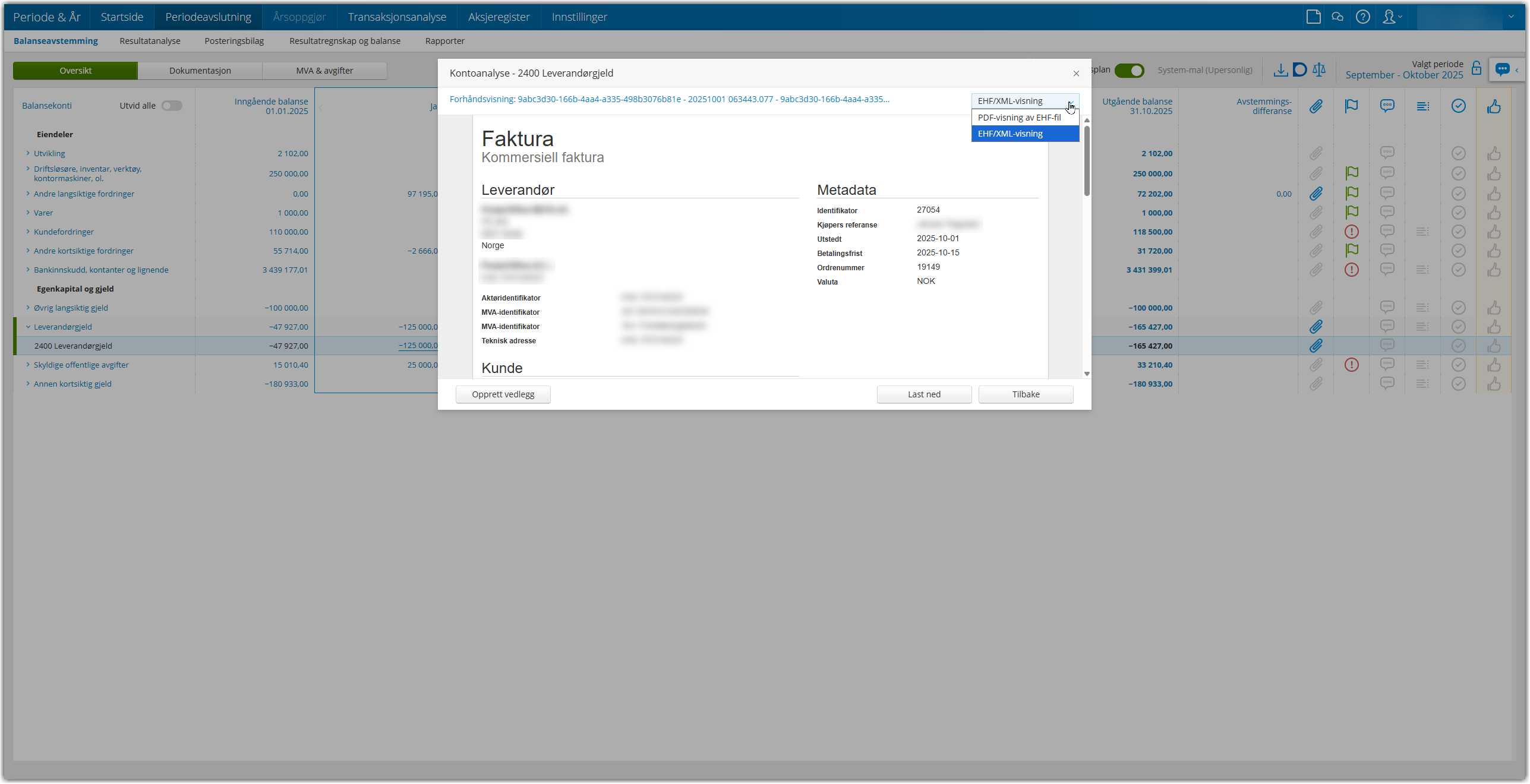
Documentation Attachment: You can create the preview (both EHF and PDF view) as a documentation attachment, in the same way as with pure PDF attachments previously.
Group Consolidation: Joint balance update
You can now update the balance figures in Period & Year for all companies in the group simultaneously via a new button.
This functionality uses the same logic as the existing import button, but allows you to update the entire group at once.