













June 2026
Client Register – Use alternative organization number for Altinn access
It is now possible for large corporate groups and centralized accounting agencies to use an alternative organization number for Altinn access than the specific unit you are currently logged into (e.g., a parent company or administrative hub that holds all the access rights).
How it works:
Contact support: This feature is not enabled by default, so support must activate it for your business.
Add organization number: Go to My accounting agency > Altinn system access, and register the organization number of the entity that actually owns the Altinn rights.
Log in: Select the company and log in via ID-porten on behalf of this organization number to retrieve the client list.
Read more about Altinn system access.
Reconciliation – column filtering in the Overview tab
Filtering is now available for the six columns on the right in the Overview tab for both balance sheet reconciliation and profit and loss (P&L) analysis.
Affected columns:
- Documentation
- Automatic controls
- Comments
- Checklists
- Completed
- Quality assurance
How it works: Click on the desired column header to display the available filtering options.

Closing entries - smarter text copying for manual postings
Entering manual journal entries is now faster! The system automatically suggests and copies text to save you repetitive typing:
From header text: Text entered in the journal header is automatically added to any empty transaction lines.
To a new line: When you create a new line (+), the text from the previous line is automatically copied down as a suggestion (just like debit/credit amounts).
Smart fallback: If the previous line is blank, the system will fetch the text from the header instead.
Reconciliation - advanced filtering in auto-generated balance reconciliation
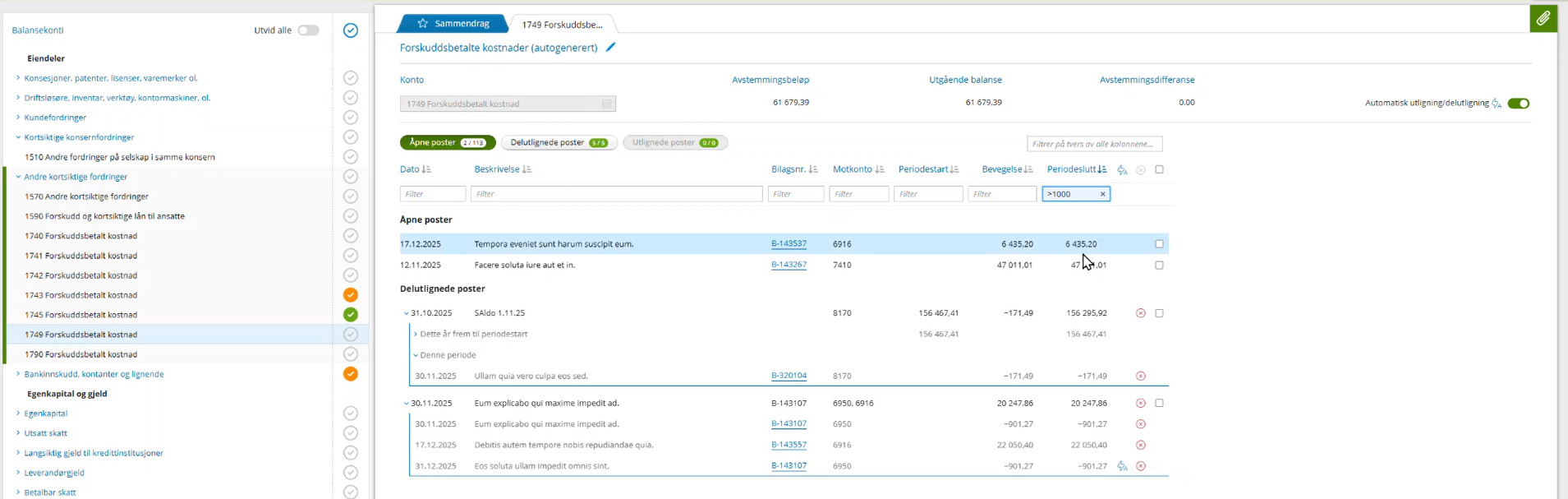
With more flexible filtering options directly within the auto-generated balance reconciliation, we are making it even faster and easier to navigate large volumes of data.
Combined search and filtering: You can now filter specifically on each individual column, or perform a global search that filters across all columns simultaneously.
Click to filter: Hover your mouse over a value in the table and click the new filter icon. The value will automatically move to the filter field, helping you quickly find corresponding rows.
Smart filter operators: Hover your mouse over the filter fields to view a tooltip displaying your options. For example, you can use operators like < or > to filter by amounts or dates.
Reconciliation - new gear icon for VAT, payroll tax, and withholding tax
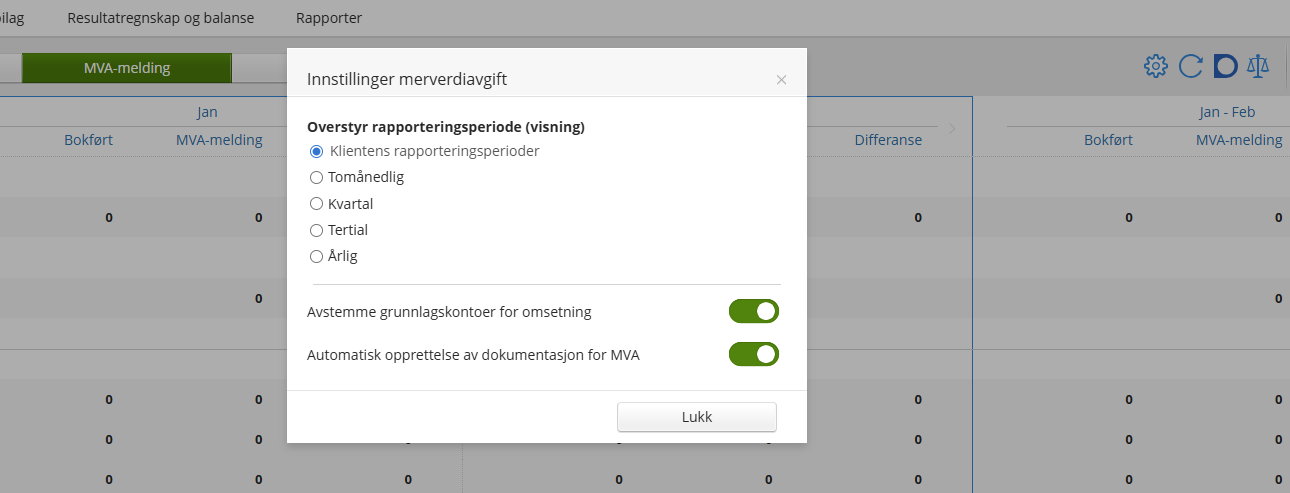
We have gathered the settings under a new gear icon located within the respective reconciliation screens. The icon opens a dedicated dialog box tailored to what you are working on (one for VAT, one for payroll tax, and one for withholding tax).
Here you can now manage the following:
Merge reporting periods: Override and merge periods (terminer) as needed.
Automatic documentation: The creation of documentation for VAT or payroll tax/withholding tax has been moved here.
Basis accounts (only in the VAT dialog): Enable or disable the reconciliation of basis accounts for turnover.
Reconciliation - data fetching for A-meldinger moved to system access
As the old Altinn 2 platform is closing down for good this June, we have now moved the data download process for the reconciliation of A-meldinger (formerly A06/A07) over to the new Altinn 3 standard using system access (systemtilgang).
What does this mean in practice? The reconciliation process itself remains exactly the same. The difference is that you no longer need to log in manually with ID-porten every time you fetch data, provided that system access is active for the client.
The status indicator now applies here too: The status indicator that became visible in the previous release now also controls whether you can fetch data for A-meldinger. If it’s green, you are good to go. If it’s blue (missing), the client must be activated in the client register before you can retrieve data.
MVA still uses ID-porten: Please note that this transition currently only applies to A-meldinger. The submission and handling of MVA still requires the usual ID-porten login just like before.
Altinn System Access – clearer status for Altinn system access
We have made it easier to see if your Altinn access is set up correctly directly inside the client! You will now see a new status indicator in Housing, Share register, Year-end closing, Period closing.
- Green checkmark (Altinn systemtilgang): Everything is set up, and the system access is active.
- Blue info icon (Systemtilgang mangler): System access has not yet been activated for this client.
When do you actually need system access?
System access in Periode & År is used for:
- Submission of the shareholder register statement (Aksjeregister)
- Submission of housing information and other third-party reporting, such as child care, donations to voluntary organizations, payments to self-employed individuals, etc. (Bolig / Årsoppgjør)
- Coming soon: Reconciliation of A-meldinger (Payroll, formerly A06/A07)
Worth noting: If you see that system access is missing for a client where you do not need to submit or reconcile any of these reports at the moment, you can safely ignore the notification and carry on with your work as usual.
Reconciliation – Overriding the reconciliation plan at the client level
You can now override the reconciliation plan directly at the client level, allowing you to skip unnecessary checkpoints for accounts that are not in use. You can do this either:
In Balance reconciliation: Directly while managing the client account as you work.
Under Settings: Via Settings - Chart of Accounts for a comprehensive review of the client.
Fixed asset register – dimension filtering
You can now filter on dimensions in the Fixed asset register. A new search field lets you search across the three dimensions (department, project, cost bearer) with exact match. Only activated dimensions are included in the search, and the filter is cleared together with other filters.
New Altinn 3 System Access in Periode & År
We have launched a new area in the client register for managing Altinn system access. This is part of the transition to the new Altinn 3 standard, where the submission of Share register statement, housing and third-party information has now been migrated.
With this new integration, you can create the primary system access directly from Periode & År and easily delegate client access internally.
Who does this apply to right now?
Initially, only those who need to submit the Shareholder Register Statement (RF-1086) are affected and must utilize the new system access to complete their submission.
Note for housing and third-party users: Although these submission types have migrated, no immediate action is required for them right now, as we are currently out of season.
Read how to get started with Altinn-system access.