About practical scenarios with Restriction groups
These examples explore the complexities of establishing user visibility in a business.
The restriction groups in the examples contain users and entities, but the same principles apply to groups that contain only entities.
Usage example 1
Problem statement
Suppose that as a system administrator, you have to configure the visibility of accounts to the appropriate users considering the following:
- There are four accountants in your organisation: User C, User D, User Y, and User Z.
- User M is the accounting manager who controls work of the accounting department.
- There are six accounts in the general ledger: Account 1, Account 2, Account 3, Account 4, Account 5, and Account 6.
- Only users C and D are allowed to see Accounts 1, 2, and 3.
- Only users Y and Z are allowed to see Accounts 4, 5, and 6.
- User M is allowed to see all accounts.
You can use either of two solutions (described below) to configure the visibility of accounts to users.
Solution 1
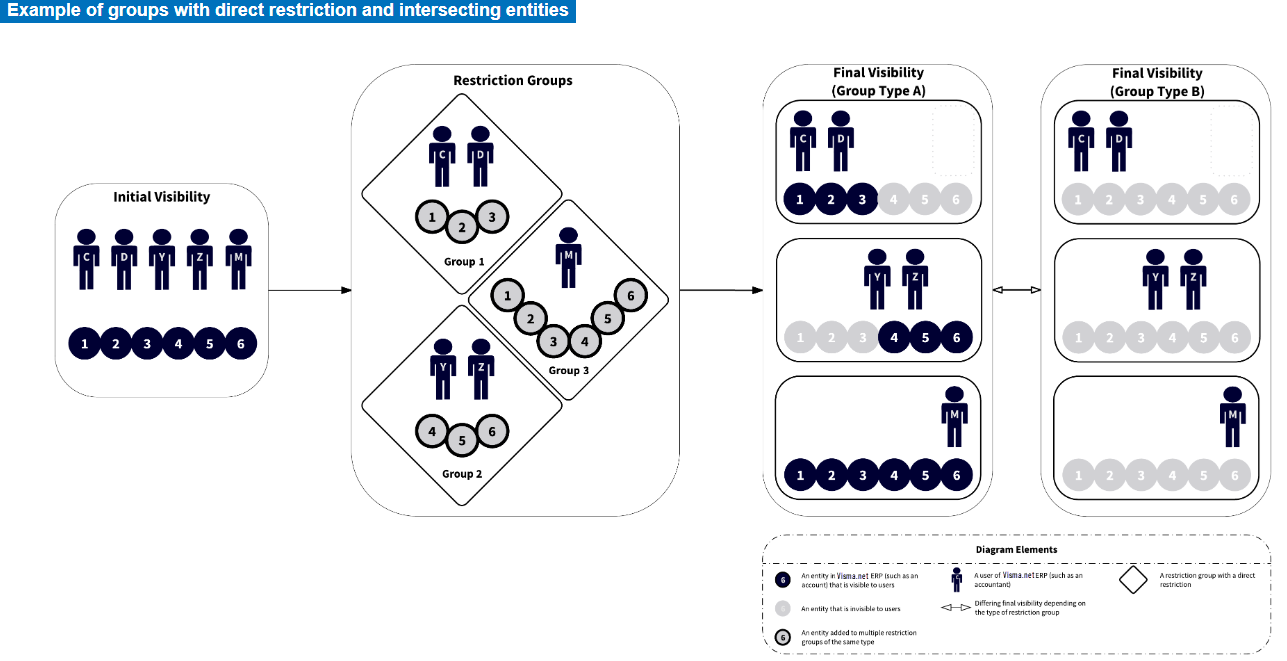
You can create three restriction groups of type A:
- Group 1: In this group, you include Accounts 1, 2, and 3 and Users C and D.
- Group 2: In this group, you include Accounts 4, 5, and 6 and Users Y and Z.
- Group 3: In this group, you include User M and all six accounts.
Solution with type B
If you were to use groups of type B instead of type A, all accounts would be hidden from the users included in Groups 1, 2, and 3. To make this approach work with groups of type B, you would need to include User M in Groups 1, 2, and 3. See Final visibility (Group type B) in the diagram below.
Solution 2
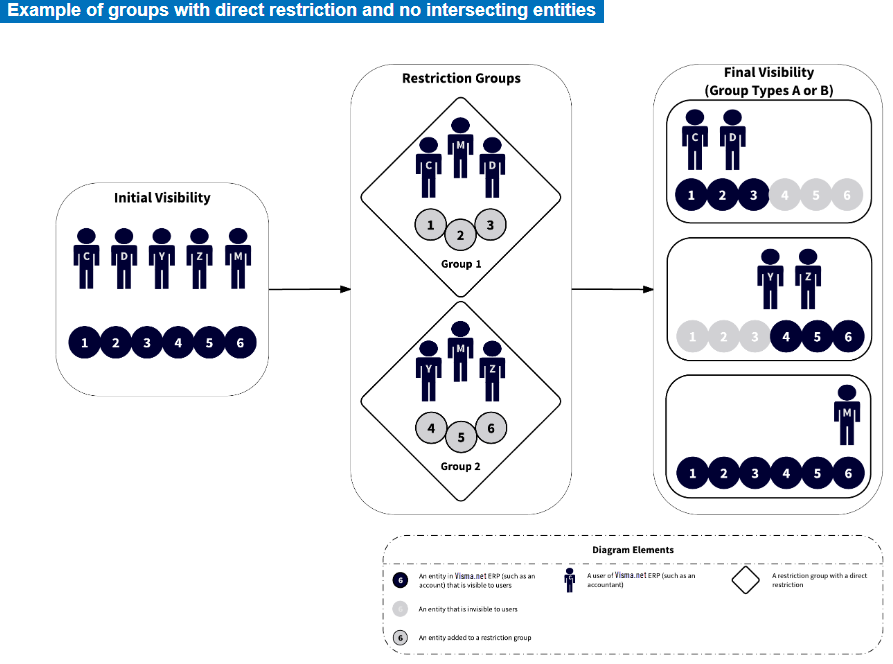
You can create two restriction groups of type A or B:
- Group 1: In this group, you include Accounts 1, 2, and 3 and Users C and D.
- Group 2: In this group, you include Accounts 4, 5, and 6 and Users Y and Z.
- You include User M in both groups.
Usage example 2
Problem statement
Suppose that as a system administrator, you have to configure the visibility of accounts to the appropriate users considering the following:
- There are four accountants: User C, User D, User Y, and User Z.
- There are six accounts in the general ledger: Account 1, Account 2, Account 3, Account 4, Account 5, and Account 6.
- User Y works with only one sensitive account, Account 1.
- User Y is not allowed to see Account 2, Account 3, Account 4, Account 5, and Account 6.
- The other accountants work with all accounts except Account 1.
- Only accountants have access to the Finance module. (Thus, there is no need to hide accounts from other system users.)
Solution
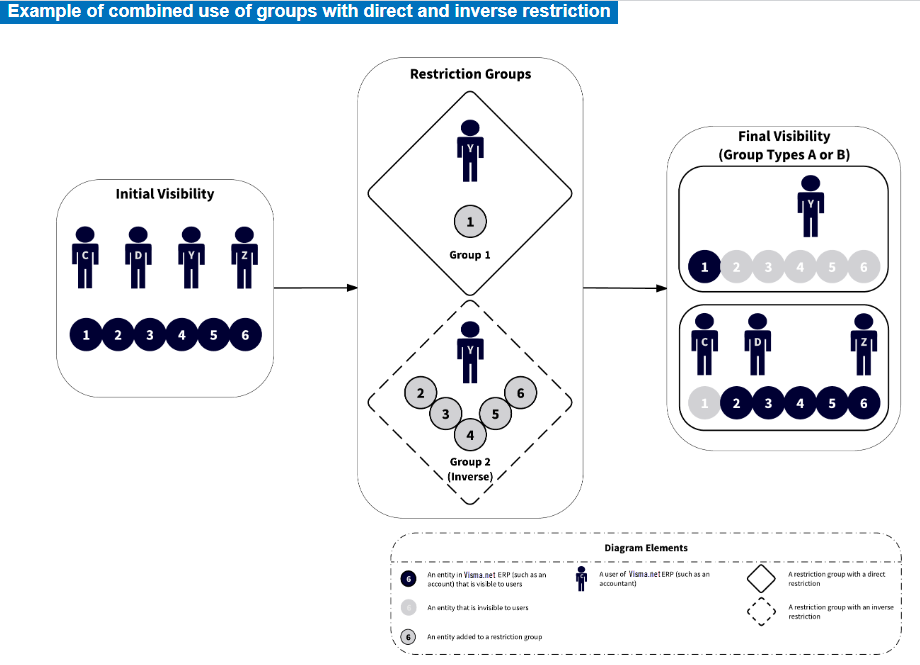
You can create two restriction groups, Group 1 of type A or B, and Group 2 of type A inverse or B inverse.
| IF | THEN |
|---|---|
| you select type A for Group 1 | you should select type A inverse for Group 2. |
| you select type B for Group 1 | you should select type B inverse for Group 2. |
These groups are defined as follows:
- Group 1: In this group, you include User Y and Account 1. (Other users will not see Account 1.)
- Group 2: In this group, you include User Y and Accounts 2 to 6. (User Y will not see these accounts.)
The following diagram illustrates the proposed solution.
Usage example 3
Problem statement
Suppose that as a system administrator, you have to configure the visibility of accounts to the appropriate users considering the following:
- There are four accountants in your organisation: User C, User D, User Y, and User Z.
- There are six accounts in the general ledger of your organisation: Account 1, Account 2, Account 3, Account 4, Account 5, and Account 6.
- Users С and D should work with all six accounts.
- User Y should work with Accounts 1, 2, and 3 but is not allowed to see Accounts 4, 5, and 6.
- User Z is a junior accountant, so this user is not allowed to see the accounts.
You can use either of two solutions (described below) to configure the visibility of accounts to users.
Solution 1
You can create two groups of type B inverse —Group 1 and Group 2 (see Final visibility (Group type B inverse) ):
- Group 1: In this group, you include User Y and Accounts 4, 5, and 6.
- Group 2: In this group, you add User Z and Accounts 1, 2, 3, 4, 5, and 6.
Solution with type A inverse
If you were to use groups of type A inverse instead of B inverse in this example, Accounts 4, 5, and 6 would be visible to all users because they are added in two restriction groups (see Final visibility (Group type A inverse ) in the following diagram).
Solution 2
You can create two groups of the A inverse or B inverse:
- Group 1: In this group, you include User Z and Accounts 1, 2, and 3.
- Group 2: In this group, you include Users Y and Z and Accounts 4, 5, and 6.
The following diagram illustrates Solution 2.