About practical scenarios with Restriction groups
/visma-net-erp/help/access-management/row-level-security/about-practical-scenarios-with-restriction-groups
section
In this topic, you will find practical situations where restriction groups can be used, each presenting a distinct problem, along with effective solutions.
2026-02-19T17:09:06+01:00
# About practical scenarios with Restriction groups
In this topic, you will find practical situations where restriction groups can be used, each presenting a distinct problem, along with effective solutions.
These examples explore the complexities of establishing user visibility in a business.
The restriction groups in the examples contain users and entities, but the same principles apply to groups that contain only entities.
## Usage example 1
### Problem statement
Suppose that as a system administrator, you have to configure the visibility of accounts to the appropriate users considering the following:
+ There are four accountants in your organisation: User C, User D, User Y, and User Z.
+ User M is the accounting manager who controls work of the accounting department.
+ There are six accounts in the general ledger: Account 1, Account 2, Account 3, Account 4, Account 5, and Account 6.
+ Only users C and D are allowed to see Accounts 1, 2, and 3.
+ Only users Y and Z are allowed to see Accounts 4, 5, and 6.
+ User M is allowed to see all accounts.
You can use either of two solutions (described below) to configure the visibility of accounts to users.
#### Solution 1
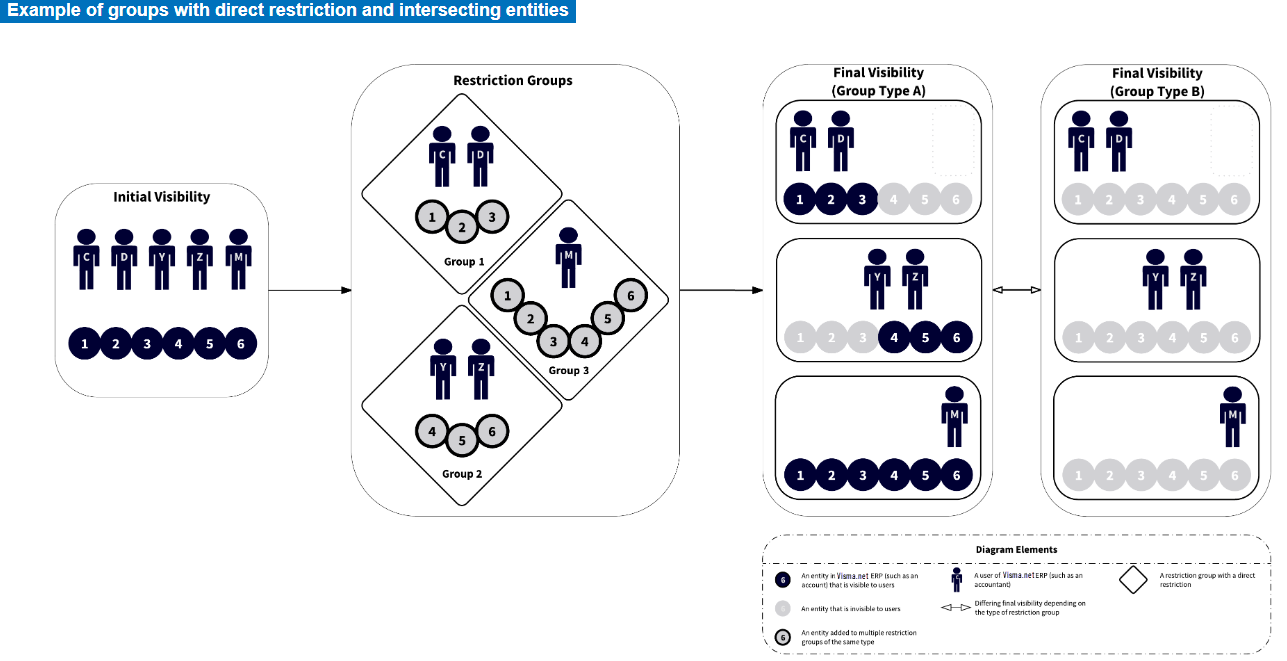
You can create three restriction groups of type **A**:
+ Group 1: In this group, you include Accounts 1, 2, and 3 and Users C and D.
+ Group 2: In this group, you include Accounts 4, 5, and 6 and Users Y and Z.
+ Group 3: In this group, you include User M and all six accounts.
#### Solution with type B
If you were to use groups of type **B** instead of type **A**, all accounts would be hidden from the users included in Groups 1, 2, and 3. To make this approach work with groups of type **B**, you would need to include User M in Groups 1, 2, and 3. See **Final visibility (Group type B)** in the diagram below.
#### Solution 2
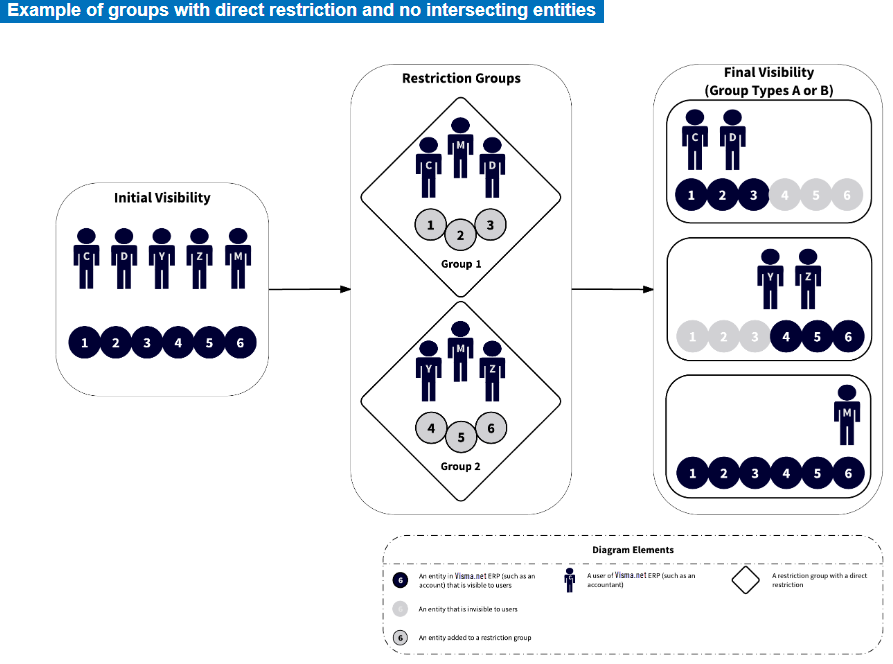
You can create two restriction groups of type **A** or **B**:
+ Group 1: In this group, you include Accounts 1, 2, and 3 and Users C and D.
+ Group 2: In this group, you include Accounts 4, 5, and 6 and Users Y and Z.
+ You include User M in both groups.
## Usage example 2
### Problem statement
Suppose that as a system administrator, you have to configure the visibility of accounts to the appropriate users considering the following:
+ There are four accountants: User C, User D, User Y, and User Z.
+ There are six accounts in the general ledger: Account 1, Account 2, Account 3, Account 4, Account 5, and Account 6.
+ User Y works with only one sensitive account, Account 1.
+ User Y is not allowed to see Account 2, Account 3, Account 4, Account 5, and Account 6.
+ The other accountants work with all accounts except Account 1.
+ Only accountants have access to the Finance module. (Thus, there is no need to hide accounts from other system users.)
#### Solution
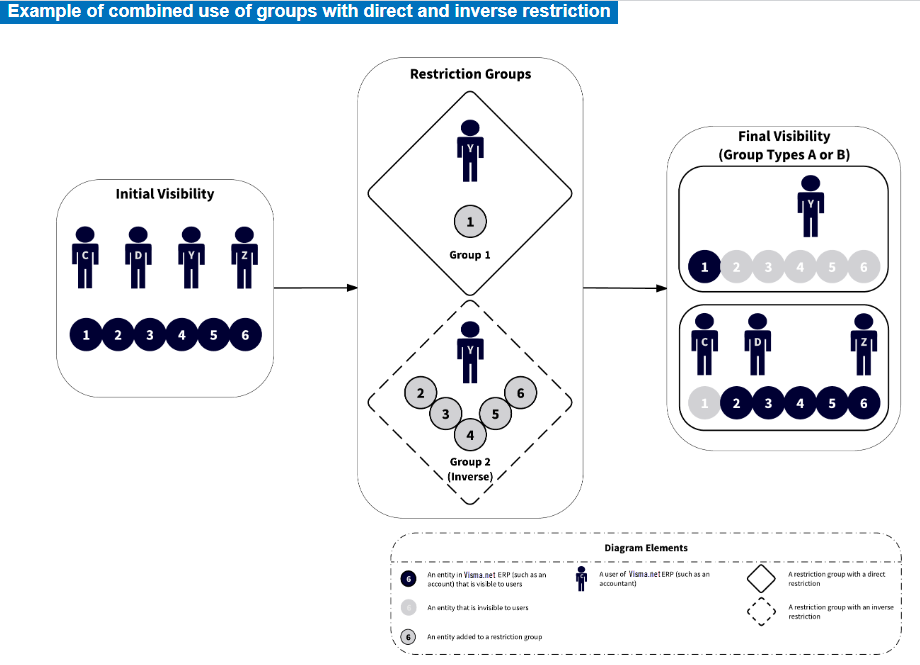
You can create two restriction groups, Group 1 of type **A** or **B**, and Group 2 of type **A inverse** or **B inverse**.
|IF|THEN|
|---|---|
|you select type **A** for Group 1|you should select type **A inverse** for Group 2.|
|you select type **B** for Group 1|you should select type **B inverse** for Group 2.|
These groups are defined as follows:
+ Group 1: In this group, you include User Y and Account 1. (Other users will not see Account 1.)
+ Group 2: In this group, you include User Y and Accounts 2 to 6. (User Y will not see these accounts.)
The following diagram illustrates the proposed solution.
## Usage example 3
### Problem statement
Suppose that as a system administrator, you have to configure the visibility of accounts to the appropriate users considering the following:
+ There are four accountants in your organisation: User C, User D, User Y, and User Z.
+ There are six accounts in the general ledger of your organisation: Account 1, Account 2, Account 3, Account 4, Account 5, and Account 6.
+ Users С and D should work with all six accounts.
+ User Y should work with Accounts 1, 2, and 3 but is not allowed to see Accounts 4, 5, and 6.
+ User Z is a junior accountant, so this user is not allowed to see the accounts.
You can use either of two solutions (described below) to configure the visibility of accounts to users.
#### Solution 1
You can create two groups of type **B inverse** —Group 1 and Group 2 (see **Final visibility (Group type B inverse)** ):
+ Group 1: In this group, you include User Y and Accounts 4, 5, and 6.
+ Group 2: In this group, you add User Z and Accounts 1, 2, 3, 4, 5, and 6.
#### Solution with type A inverse
If you were to use groups of type **A inverse** instead of **B inverse** in this example, Accounts 4, 5, and 6 would be visible to all users because they are added in two restriction groups (see **Final visibility (Group type A inverse** ) in the following diagram).

#### Solution 2
You can create two groups of the **A inverse** or **B inverse**:
+ Group 1: In this group, you include User Z and Accounts 1, 2, and 3.
+ Group 2: In this group, you include Users Y and Z and Accounts 4, 5, and 6.
The following diagram illustrates Solution 2.