About invoice order processing options
/visma-net-erp/help/sales/process-sales-orders/about-invoice-order-processing-options
section
An invoice order, which has the IN order type selected in the Sales orders (SO301000) window, is a special type of sales order that you create when goods requested by a customer have been shipped or delivered already.
2026-02-19T17:09:06+01:00
# About invoice order processing options
An invoice order, which has the IN order type selected in the Sales orders (SO301000) window, is a special type of sales order that you create when goods requested by a customer have been shipped or delivered already.
For more information: [Sales orders (SO301000)](/visma-net-erp/help/sales/sales-windows/sales-orders-so301000/).
An invoice order, which has the **IN** order type selected in the [Sales orders (SO301000)](/visma-net-erp/help/sales/sales-windows/sales-orders-so301000/) window, is a special type of sales order that you
create when goods requested by a customer have been shipped or delivered already.
The
processing of orders of this type does not involve shipments.
## Invoice order creation
New orders of the **IN** type will be saved with the **On hold** status by default if
the **Hold orders on entry** check box is selected for this order type
in the [Order types (SO201000)](/visma-net-erp/help/sales/sales-windows/order-types-so201000/) window.
The reference numbers for new
orders are generated according to the number series assigned to this order type in the [Order types (SO201000)](/visma-net-erp/help/sales/sales-windows/order-types-so201000/) window.
An invoice order is created by using the [Sales orders (SO301000)](/visma-net-erp/help/sales/sales-windows/sales-orders-so301000/) window.
For an invoice order, you specify the following information:
+ The order type **IN**
+ The customer, its location, and its VAT information (VAT zone and VAT registration ID)
+ A list of included stock and non-stock items with their quantities, units of measure, and unit prices
+ The credit terms
+ The payment method, if it is different from the default one
For items that have lot or serial numbers tracked in Visma Net, you can specify these numbers, thus indicating that these particular items have been delivered to the customer.
You should clear the **On hold** check box for the order to process its further.
## Approval of invoice orders
If approval is
required, when an invoice order is taken off hold, the system assigns an invoice order the
**Pending approval** status and selects an approver for the order, in accordance with
the approval map used for invoice orders.
If the approver approves the order, the order gets
the **Open** status.
If the approver rejects the order, the order gets the
**Rejected** status.
If the order is then edited, the system changes the status to
**Pending approval**.
## General workflow
The processing of invoice orders involves using the following actions and generating the following documents.
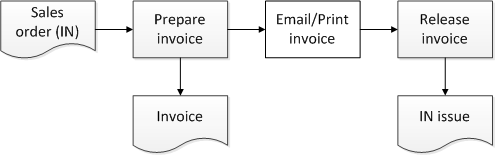
You can prepare a sales invoice for a particular order by clicking **Actions** - **Prepare invoice** in the window toolbar of the [Sales orders (SO301000)](/visma-net-erp/help/sales/sales-windows/sales-orders-so301000/) window, or you can create sales invoices by executing the **Prepare invoice** action for the multiple selected invoice sales orders in the [Process orders (SO501000)](/visma-net-erp/help/sales/sales-windows/process-orders-so501000/) window.
Inventory issues will be released automatically on release of invoices if the **Automatically release inventory documents** check box is selected in the [Sales order preferences (SO101000)](/visma-net-erp/help/sales/sales-windows/sales-order-preferences-so101000/) window.
Related pages
Concepts
Windows