API Support
/vismanetapi/setting-up-your-integration/api-support
section
Policies and procedures for API support
2026-01-07T09:33:36+01:00
# API Support
Policies and procedures for API support
## About this Support Policy
This API Support Policy describes the policies and procedures under which the API Support Team provides support services for its proprietary software product(s) to its Independent Software Vendors.
## What Visma Net API Support Service Covers
We provide support for:
- **Endpoints** are available on Visma Net Swagger [https://finance.visma.net/swaggerui/index.html](https://finance.visma.net/swaggerui/index.html) and SalesOrder Swagger [https://salesorder.visma.net/swagger/index.html](https://salesorder.visma.net/swagger/index.html)
- API Endpoint Usage
- API Endpoint Functionality
- JSON Syntax
- Addressing API Feature requests & Bug Reports
- Providing code examples & Documentation for API Endpoint Usage
- API Troubleshooting
Before contacting API Support, please first check the API documentation and Training Materials available on [Visma Learning Universe](https://www.vismalearninguniverse.com/learn/learning-plans/104/visma-net-api-integration-courses?hash=5a31d510748a706a574903e668ec6e84127593c0&generated_by=37643) and [Discord API Community](https://discord.gg/3qupM). Your question might have been answered already.
For help regarding **Visma Net Financials ERP (UI)**; company configuration, setup or module usage, inform your Visma Net Financials customer to contact the market’s related Financials ERP Support or your Partner Service for further procedure guidelines.
## What Is Not Covered by API Support
We don’t provide support for:
- Assistance in writing code and general code debugging for third-party software & integrations & applications.
- Troubleshooting & technical support for external Software & Applications written by third parties.
- Visma Net Financials ERP (UI) related topics.
## Support Methods
When seeking support, please be prepared to provide information on your attempts to debug and isolate the Visma Net API problem.
Information needed:
- Used API Endpoint URL / Method
- Returned HTTP Status Code
- Returned Response Body (Error Message)
- For POST/PUT requests, attach the Used RAW JSON script.
These details are crucial for API Support consultants to help diagnose your issue. For example, we may ask you to provide a simple test case that demonstrates the problem or replicate the problem outside of your application.
If we cannot diagnose a problem with the APIs, we may be limited to providing suggestions on how you can resolve the issue. Since API adheres to the rules of the Financials ERP, we may also suggest the use of Visma Net Support to help you locate and fix UI originated problems.
Accordingly, restoring your Financials company DB into our local environment is another option that API Support Team can ask your data owner’s approval in order to get access for the development team to perform further diagnostics on your issue occurred data at Visma side.
For more details on how to report cases, please view [API incidents - Troubleshooting and reporting](./report-api-cases.md)
## Support Language & Channels
Visma Net API Support channels:
- **The forum** [Discord API Community](https://discord.gg/3qupM)
- For **One-to-one email support**, Partners can create tickets via [Partner Portal](https://visma-swno.my.site.com/s/) while others can send email to
- **One-to-one consulting meeting** is available with hourly charges via [Partner Portal](https://visma-swno.my.site.com/s/) and
## Supplementary Glossary
| Term | Definition |
|------------------|-----------------------------------------------------------------------------------------------------------------------------------------------------|
| ISV | Independent Software Vendors integrating their software with Visma Net Services through endpoints. |
| Client | ISVs can have multiple clients integrating with API & Visma Net Services. |
| Customer | An entity purchasing Visma Net application with an agreement and invoicing arrangement, can be a company, reseller, or private user. |
| User | Individual using one or more Visma Net applications via Visma Net Integrations. |
| API | Application Program Interface facilitating client-side software applications development. |
| Endpoint | Connection point for API allowing software program communication. |
| DTO | Data Transfer Object |
| DB | Database storing Financials Company data. |
| HTTP Status Code | Protocol response codes for Hypertext Transfer Protocol. |
| Financials ERP | Visma.Net Financials ERP Cloud Application. |
| JSON | Open-standard file format or data interchange format known as JavaScript Object Notation. |
| Client Id | Unique ID for a Client, e.g., visma_test_client_1234 |
| Client Secret | Secret code linked to Client and Client ID, only known to ISV/Owner. Example: 284baba4-7a8d-4e14-2247-957812ac9ec |
| Redirect URI | Web address for API authentication process to send Authorization Code back to the Client, can have multiple definitions per Client. |
| User | A person having access to Visma.net ERP. |
API incidents - Troubleshooting and reporting
/vismanetapi/setting-up-your-integration/api-support/report-api-cases
page
Steps to troubleshoot and report issues for timely resolution.
2026-01-07T09:33:36+01:00
# API incidents - Troubleshooting and reporting
Steps to troubleshoot and report issues for timely resolution.
## Encountering an Issue
### First Troubleshooting Steps
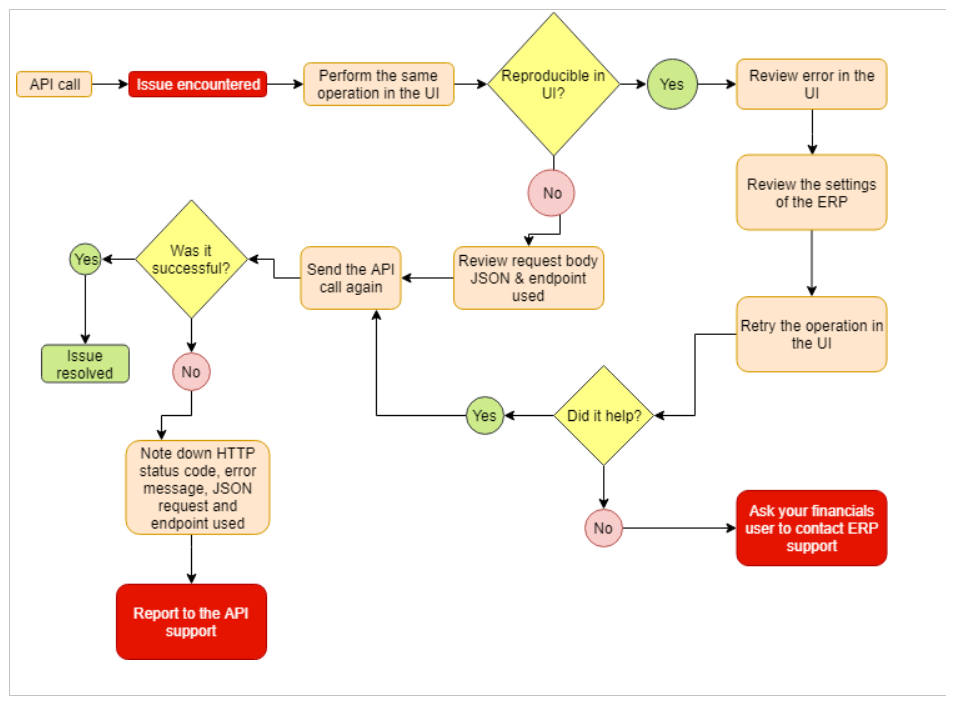
When encountering an issue using the API there are steps you’ll want to follow to understand where the issue occurs and what support channels it should be reported via to resolve the issue in a timely manner.
1. If the issue is reproducible in the UI, review the error message in the UI, this will often point you to where in the ERP you might need to review settings. If this doesn’t help, inform your ERP UI user that they need to open a case through the ERP support channels specific to the market.
2. If the issue is not reproducible in the UI, review the action being performed via the API.
3. Are you using the correct endpoint for what you want to do?
4. Can the error message inform you what is going wrong? You might need to review the JSON request body, to see the syntax and required fields for the endpoint, please have a look at the Visma Net API Swagger found at [https://finance.visma.net/swaggerui/index.html](https://finance.visma.net/swaggerui/index.html) or SalesOrder API Swagger found at [https://salesorder.visma.net/swagger/index.html](https://salesorder.visma.net/swagger/index.html)
5. If you have reviewed this and are still unable to resolve the issue, head over to the [Discord API Community](https://discord.com/invite/3qupMPPr4K) to find similar problems. If you don't find anything similar, create a new post and include all relevant information, as explained later in this document. This will allow other Discord users, including Visma employees, to help you with your issue.
6. If you're still unable to find a solution please contact API support. When contacting API support, make sure to include all relevant information, as explained later in this document. Partners can create a ticket in the [Partner Portal](https://visma-swno.my.site.com/s/), while others can email .
### Reporting the Issue
To expedite issue resolution, provide as much relevant information as possible when reporting an issue, either in Discord posts or for direct API support.
**Share information such as:**
1. The **API Endpoint URL/Method** you used
2. The **HTTP Status Code** returned
3. The **Response Body (Error Message)**
4. For POST/PUT requests, attach the **RAW JSON script** used
These details are essential for diagnosing your issue.
#### Exaplain what you are trying to do?
- Explain your objective, the expected results, and the actual results.
- Detail the workflow you followed.
**Your Request:**
1. **Method and URL** to endpoint where the issue occurs
e.g., `GET https://api.finance.visma.net/v1/inventory`
2. **JSON request body**
```json
{ "My JSON" : { "Value": "Request" } }
```
**The Server's Response:**
- **HTTP Status Code:**
```plaintext
201 Created
```
- **JSON response body:**
```json
{ "Servers JSON" : { "Value": "Response" } }
```