Attachment
/vismanetapi/setting-up-your-integration/how-tos/attachment
section
How to post and fetch attachments
2026-01-07T16:21:53+01:00
# Attachment
How to post and fetch attachments
## How to POST an Attachment via Visma Net API in C#?
> [!Note]
> Please read more about the attachment-specific endpoints at [Documentation/Swagger](https://docs.vismasoftware.no/vismanetapi/#documentationswagger)
### WebClient Class
```csharp
public void postAttachment(string[] files, string , string token, string companyId)
{
using (WebClient client = new WebClient())
{
client.Headers.Add("ipp-company-id", "");
client.Headers.Add("ipp-application-type", "Visma.net Financials");
client.Headers.Add("Authorization", "bearer");
for (int i = 0; i < files.Length; i++) // Multiple
{
byte[] responseArray = client.UploadFile(
@"https://api.finance.visma.net/v1///Attachment",
"POST",
files[i]
);
}
}
}
```
### HttpClient Class
```csharp
public void postAttachmentHttpClient()
{
using (var client = new HttpClient())
{
client.DefaultRequestHeaders.Add("ipp-application-type", "Visma.net Financials");
client.DefaultRequestHeaders.Add("ipp-company-id", "");
client.DefaultRequestHeaders.Add("Authorization", "Bearer ");
HttpResponseMessage response;
var content = new MultipartFormDataContent();
var path = Path.Combine(@"");
string fileName = Path.GetFileName(path);
FileStream fs = File.OpenRead(path);
var sc = new StreamContent(fs);
sc.Headers.Add("Content-Type", "application/octet-stream");
sc.Headers.Add("Content-Disposition","form-data; name=\"file\"; filename=\"" + Path.GetFileName(path) + "\"");
content.Add(sc, "file", fileName);
response = client.PostAsync(@"https://api.finance.visma.net/v1///Attachment", content).Result;
}
}
```
> [!Important]
> The sample code is provided “AS IS” and any express or implied warranties, including the implied warranties of merchantability and fitness for a particular purpose, are disclaimed. In no event shall Visma or contributors be liable for any direct, indirect, incidental, special, exemplary or consequential damages.
## How to fetch attachment
**Step 1.** Fetch the attachmentid from the document, for example
GET
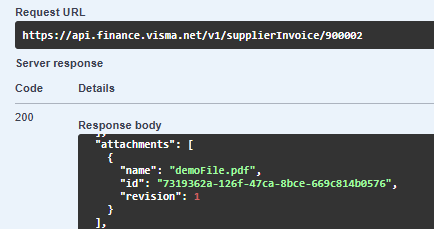
**Step 2.** Fetch the Base64 using the attachmentid from step one in the attachment endpoint. For example:
GET
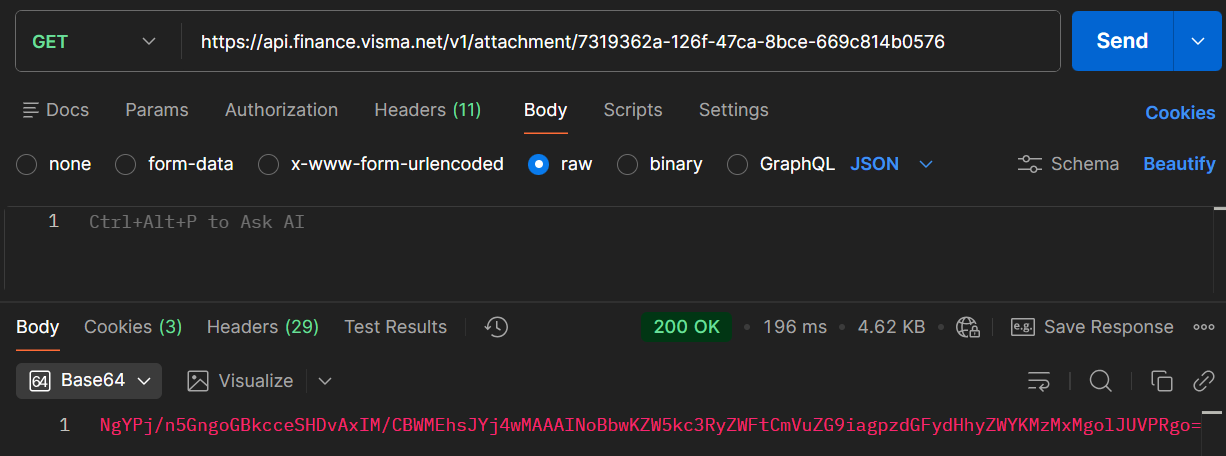
**Step 3.**
Once you have fetched the Base64, you should be able to decode it to a file