API incidents - Troubleshooting and reporting
Steps to troubleshoot and report issues for timely resolution.
Encountering an Issue
First Troubleshooting Steps
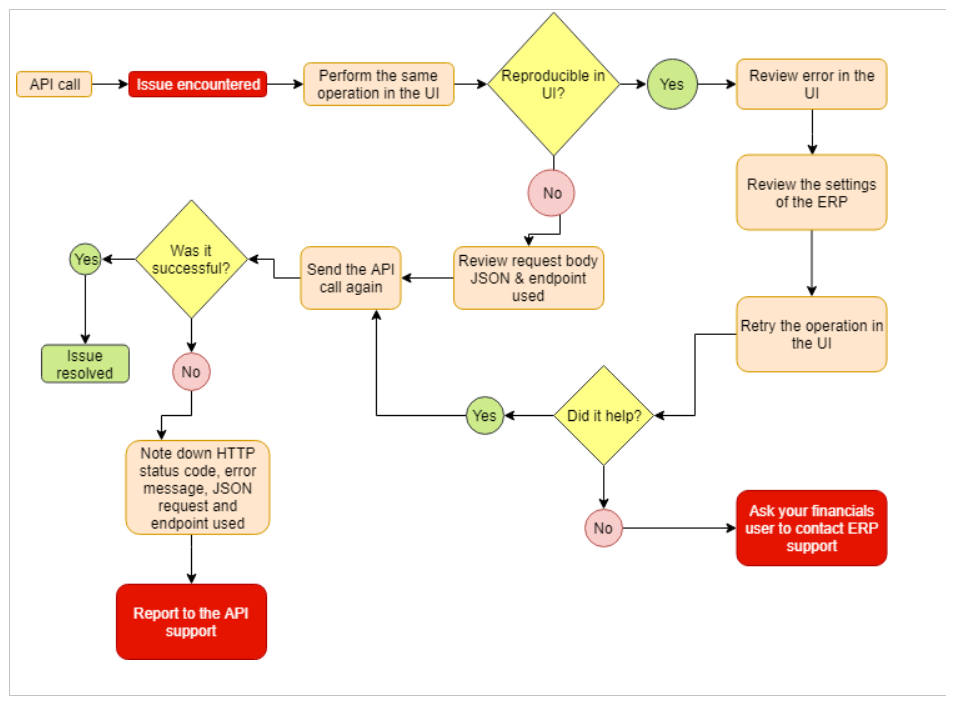
When encountering an issue using the API there are steps you’ll want to follow to understand where the issue occurs and what support channels it should be reported via to resolve the issue in a timely manner.
- If the issue is reproducible in the UI, review the error message in the UI, this will often point you to where in the ERP you might need to review settings. If this doesn’t help, inform your ERP UI user that they need to open a case through the ERP support channels specific to the market.
- If the issue is not reproducible in the UI, review the action being performed via the API.
- Are you using the correct endpoint for what you want to do?
- Can the error message inform you what is going wrong? You might need to review the JSON request body, to see the syntax and required fields for the endpoint, please have a look at the Visma Net API Swagger found at https://finance.visma.net/swaggerui/index.html or SalesOrder API Swagger found at https://salesorder.visma.net/swagger/index.html
- If you have reviewed this and are still unable to resolve the issue, head over to the Discord API Community to find similar problems. If you don’t find anything similar, create a new post and include all relevant information, as explained later in this document. This will allow other Discord users, including Visma employees, to help you with your issue.
- If you’re still unable to find a solution please contact API support. When contacting API support, make sure to include all relevant information, as explained later in this document. Partners can create a ticket in the Partner Portal, while others can email cloud.api.support@visma.com.
Reporting the Issue
To expedite issue resolution, provide as much relevant information as possible when reporting an issue, either in Discord posts or for direct API support.
Share information such as:
- The API Endpoint URL/Method you used
- The HTTP Status Code returned
- The Response Body (Error Message)
- For POST/PUT requests, attach the RAW JSON script used
These details are essential for diagnosing your issue.
Exaplain what you are trying to do?
- Explain your objective, the expected results, and the actual results.
- Detail the workflow you followed.
Your Request:
-
Method and URL to endpoint where the issue occurs
e.g.,GET https://api.finance.visma.net/v1/inventory -
JSON request body
{ "My JSON" : { "Value": "Request" } }
The Server’s Response:
-
HTTP Status Code:
201 Created -
JSON response body:
{ "Servers JSON" : { "Value": "Response" } }
Last modified January 7, 2026