











How to add an attachment to an order
You can add an attachment to an order by runnning the AddAttachment processing on the Order table.
The following query adds an attachment to an existing order:
mutation upload_invoice_attachment(
        $cid: Int!,
        $orderNo: Int!,
        $fileName: String!,
        $description: String!,
        $data: String!)
{
  useCompany(no: $cid) {
    order_processings {
      addAttachment(
        filter: { orderNo: { _eq: $orderNo } },
        args: {
           description: $description,
           fileName: $fileName,
           fileBytes: $data,
           sendWithInvoicesAndCreditNotes : 1
        }
      )
      {
        succeeded
      }
    }
  }
}The content of the attachment must be provided as a base64 encoded string.
The precence of the sendWithInvoicesAndCreditNotes : 1 argument will set the order attachment processing to Invoices/credit notes. You can see this in the front-end, when you look at the Order attachment processing column of the Order attachment table.
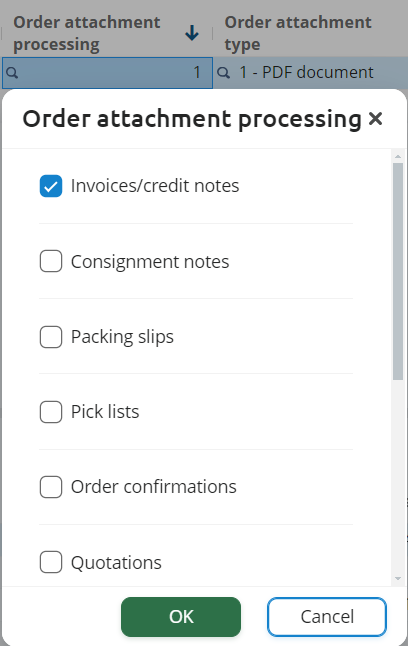
If you want to set any of the other available values, such as Pick lists or Packing slips, then you must use the sendWithDocumentTypes parameter instead. The following table shows the available values for this parameter:
| Value | Description |
|---|---|
| 1 | Invoices/credit notes |
| 2 | Consignment notes |
| 4 | Packing slips |
| 8 | Pick lists |
| 16 | Order confirmations |
| 32 | Quotations |
| 64 | Purchase orders |
| 128 | Inquiries |
| 256 | Production orders |
| 512 | Order prints |
| 1024 | Approval requests |
The following example shows how to set the sendWithDocumentTypes parameter to Packing slips:
mutation upload_packing_slip_attachment(
        $cid: Int!,
        $orderNo: Int!,
        $fileName: String!,
        $description: String!,
        $data: String!)
{
  useCompany(no: $cid) {
    order_processings {
      addAttachment(
        filter: { orderNo: { _eq: $orderNo } },
        args: {
           description: $description,
           fileName: $fileName,
           fileBytes: $data,
           sendWithDocumentTypes : 4
        }
      )
      {
        succeeded
      }
    }
  }
}Beware there is a limit to the raw size of a request. Currently, this is set at 15MB. This limit may be prone to future changes.