











How to read text from the Text table
Overview
The Text table contains text values for various fields from many tables. Examples are the text values for the payment method and delivery method of an order.
It is a common need to retrieve these texts. The following image shows possible values for the payment method for an order:
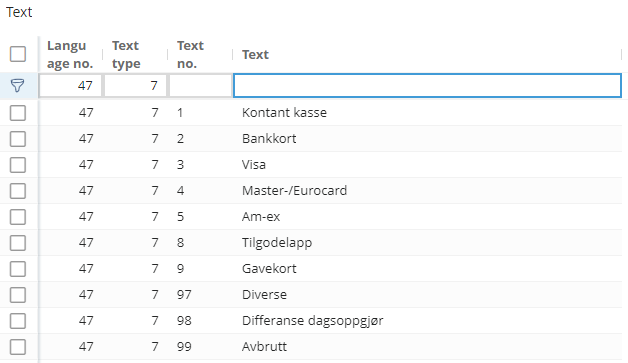
These values can be retrieved with a query as follows:
query read_payment_methods($cid :Int!)
{
  useCompany(no :$cid)
  {
    text(filter:{_and : [
      {textType : {_eq : 7}},
      {languageNo : {_eq : 47}}
    ]})
    {
      totalCount
      items
      {
        textNo
        text
      }
    }
  }
}{
"data": {
"useCompany": {
"text": {
"totalCount": 10,
"items": [
{
"textNo": 1,
"text": "Kontant kasse"
},
{
"textNo": 2,
"text": "Bankkort"
},
{
"textNo": 3,
"text": "Visa"
},
{
"textNo": 4,
"text": "Master-/Eurocard"
},
{
"textNo": 5,
"text": "Am-ex"
},
{
"textNo": 8,
"text": "Tilgodelapp"
},
{
"textNo": 9,
"text": "Gavekort"
},
{
"textNo": 97,
"text": "Diverse"
},
{
"textNo": 98,
"text": "Differanse dagsoppgjør"
},
{
"textNo": 99,
"text": "Avbrutt"
}
]
}
}
}
}Filtering
These text values are available in multiple languages. Therefore, you need to filter by language and text type, as shown in the previous example.
The possible values for languages are the following:
| LanguageNo | Language |
|---|---|
| 44 | English |
| 45 | Danish |
| 46 | Swedish |
| 47 | Norwegian |
The possible values for the texttype field are presented in the following table:
| Text type | Description (Identifier) |
|---|---|
| 1 | FreeText |
| 2 | ReminderText |
| 3 | DocumentName |
| 4 | DeliveryTerms |
| 5 | DeliveryMethod |
| 6 | PaymentTerms |
| 7 | PaymentMethod |
| 8 | InformationCategory |
| 9 | District |
| 10 | Trade |
| 11 | OrderPriceGroup |
| 12 | CustomerPriceGroup1 |
| 13 | ProductPriceGroup1 |
| 14 | EmployeePriceGroup |
| 15 | PayrollRateNo |
| 16 | Unit |
| 17 | TaxAndAccountingGroup |
| 18 | AccountSet |
| 19 | ProductType1 |
| 20 | TransactionGroup1 |
| 21 | ProductPriceGroup2 |
| 22 | BudgetLineType |
| 23 | StockCountGroup |
| 24 | AssociateGrouping1 |
| 25 | AssociateGrouping2 |
| 26 | AssociateGrouping3 |
| 27 | AssociateGrouping4 |
| 28 | AssociateGrouping5 |
| 29 | AssociateGrouping6 |
| 30 | GeneralLedgerAccountGrouping1 |
| 31 | GeneralLedgerAccountGrouping2 |
| 32 | GeneralLedgerAccountGrouping3 |
| 33 | GeneralLedgerAccountGrouping4 |
| 34 | GeneralLedgerAccountGrouping5 |
| 35 | GeneralLedgerAccountGrouping6 |
| 36 | OrgUnitGrouping1 |
| 37 | OrgUnitGrouping2 |
| 38 | OrgUnitGrouping3 |
| 39 | OrgUnitGrouping4 |
| 40 | OrgUnitGrouping5 |
| 41 | OrgUnitGrouping6 |
| 42 | ProductGrouping1 |
| 43 | ProductGrouping2 |
| 44 | ProductGrouping3 |
| 45 | ProductGrouping4 |
| 46 | ProductGrouping5 |
| 47 | ProductGrouping6 |
| 48 | OrderGrouping1 |
| 49 | OrderGrouping2 |
| 50 | OrderGrouping3 |
| 51 | OrderGrouping4 |
| 52 | OrderGrouping5 |
| 53 | OrderGrouping6 |
| 54 | ProductTransactionControlStatus |
| 55 | AccountingTransactionControlStatus |
| 56 | ReportHeading |
| 57 | SumLine |
| 58 | ProductType2 |
| 59 | TransactionGroup2 |
| 60 | OrgUnitStatus |
| 61 | CapitalAssetGrouping1 |
| 62 | CapitalAssetGrouping2 |
| 63 | CapitalAssetGrouping3 |
| 64 | CapitalAssetGrouping4 |
| 65 | CapitalAssetGrouping5 |
| 66 | CapitalAssetGrouping6 |
| 67 | PaymentPriority |
| 68 | DeliveryPriority |
| 69 | AppointmentPriority |
| 70 | DayPriority |
| 71 | DocumentGroup |
| 72 | ProductPriceGroup3 |
| 73 | CustomerPriceGroup2 |
| 74 | AssociateGrouping7 |
| 75 | AssociateGrouping8 |
| 76 | AssociateGrouping9 |
| 77 | AssociateGrouping10 |
| 78 | AssociateGrouping11 |
| 79 | AssociateGrouping12 |
| 80 | GeneralLedgerAccountGrouping7 |
| 81 | GeneralLedgerAccountGrouping8 |
| 82 | GeneralLedgerAccountGrouping9 |
| 83 | GeneralLedgerAccountGrouping10 |
| 84 | GeneralLedgerAccountGrouping11 |
| 85 | GeneralLedgerAccountGrouping12 |
| 86 | CapitalAssetGrouping7 |
| 87 | CapitalAssetGrouping8 |
| 88 | CapitalAssetGrouping9 |
| 89 | CapitalAssetGrouping10 |
| 90 | CapitalAssetGrouping11 |
| 91 | CapitalAssetGrouping12 |
| 92 | OrgUnitGrouping7 |
| 93 | OrgUnitGrouping8 |
| 94 | OrgUnitGrouping9 |
| 95 | OrgUnitGrouping10 |
| 96 | OrgUnitGrouping11 |
| 97 | OrgUnitGrouping12 |
| 98 | ProductGrouping7 |
| 99 | ProductGrouping8 |
| 100 | ProductGrouping9 |
| 101 | ProductGrouping10 |
| 102 | ProductGrouping11 |
| 103 | ProductGrouping12 |
| 104 | OrderGrouping7 |
| 105 | OrderGrouping8 |
| 106 | OrderGrouping9 |
| 107 | OrderGrouping10 |
| 108 | OrderGrouping11 |
| 109 | OrderGrouping12 |
| 110 | TransactionGroup3 |
| 111 | TransactionGroup4 |
| 112 | ProductType3 |
| 113 | ProductType4 |
| 114 | AppointmentGrouping1 |
| 115 | AppointmentGrouping2 |
| 116 | AppointmentGrouping3 |
| 117 | AppointmentGrouping4 |
| 118 | AppointmentGrouping5 |
| 119 | AppointmentGrouping6 |
| 120 | AppointmentGrouping7 |
| 121 | AppointmentGrouping8 |
| 122 | AppointmentGrouping9 |
| 123 | AppointmentGrouping10 |
| 124 | AppointmentGrouping11 |
| 125 | AppointmentGrouping12 |
| 126 | PriceType |
| 127 | CreateDocument |
| 128 | CrmTexts |
| 129 | EftCurrencyCode |
| 130 | EftTaxCode |
| 131 | EftDeclarationCode |
| 132 | EftPaymentMethod |
| 133 | PriceRefundGrouping1 |
| 134 | PriceRefundGrouping2 |
| 135 | EuGoodsStatisticsNo |
| 137 | AssociateInformationGroup1 |
| 138 | AssociateInformationGroup2 |
| 139 | AssociateInformationGroup3 |
| 140 | AssociateInformationGroup4 |
| 141 | AssociateInformationGroup5 |
| 142 | AssociateInformationGroup6 |
| 143 | AssociateInformationGroup7 |
| 144 | AssociateInformationGroup8 |
| 145 | ProductCategory |
| 146 | CustomerPriceGroup3 |
| 147 | ProxyType |
| 148 | RoleType |
| 149 | MessageType |
| 150 | ExternalConfigurationGrouping1 |
| 151 | ExternalConfigurationGrouping2 |
| 152 | ExternalConfigurationGrouping3 |
| 153 | ExternalConfigurationGrouping4 |
| 154 | InterestRateGroup |
| 155 | SmsProvider |
| 156 | FreeInformationType1 |
| 157 | FreeInformationGrouping1 |
| 158 | FreeInformationGrouping2 |
| 159 | FreeInformationGrouping3 |
| 160 | FreeInformationGrouping4 |
| 161 | ShipmentGrouping1 |
| 162 | ShipmentGrouping2 |
| 163 | VoucherGroup1 |
| 164 | VoucherGroup2 |
| 165 | VoucherTypeText |
| 166 | AlternativeProductGrouping1 |
| 167 | AlternativeProductGrouping2 |
| 168 | StructureGrouping1 |
| 169 | StructureGrouping2 |
| 170 | StructureGrouping3 |
| 171 | StructureGrouping4 |
| 172 | StructureGrouping5 |
| 173 | StructureGrouping6 |
| 174 | StructureGrouping7 |
| 175 | StructureGrouping8 |
| 176 | StructureGrouping9 |
| 177 | StructureGrouping10 |
| 178 | StructureGrouping11 |
| 179 | StructureGrouping12 |
| 180 | FreeInformationCategory |
| 181 | ExternalExportGrouping |
| 182 | TimeScheduleBalanceGroup |
| 183 | TaxTerm |
| 184 | BankFormat |
| 185 | AppointmentDescription |
| 186 | RemittanceCodeForRemittanceAgreements |
| 187 | RegistrationTypeForPaymentAgreements |
| 188 | CommentCodeForPaymentAgreements |
| 189 | FreeInformation1Type2 |
| 190 | FreeInformation1Type3 |
| 191 | FreeInformation2Type2 |
| 192 | FreeInformation2Type3 |
| 193 | FreeInformation3Type2 |
| 194 | FreeInformation3Type3 |
| 195 | FreeInformationGrouping5 |
| 196 | FreeInformationGrouping6 |
| 197 | FreeInformationGrouping7 |
| 198 | FreeInformationGrouping8 |
| 199 | FreeInformationGrouping9 |
| 200 | FreeInformationGrouping10 |
| 201 | FreeInformationGrouping11 |
| 202 | FreeInformationGrouping12 |
| 203 | EftFormType |
| 204 | DeliveryAlternativeGrouping1 |
| 205 | DeliveryAlternativeGrouping2 |
| 206 | GiroType |
| 207 | OssTaxTerm |
| 208 | EmailTemplateGroup |
| 211 | ExemptReason |
| 212 | InvoiceNote |
Joining values from the text table
The values from the Text table are usually needed when reading records from other tables. An example was previously given: reading the payment method and the delivery method of an order.
A direct joining mechanism is not available in the API (such as a joinup_ \ joindown_ relation). However, it is possible to read them in a single query with the help of the @export directive.
The following example shows how to read the payment and delivery method of a particular order:
query read_texts($cid : Int!,
                 $orderNo : Int,
                 $dm : Long = 0,
                 $pm : Long  = 0)
{
  useCompany(no : $cid)
  {
    order(filter :{orderNo :{_eq : $orderNo}})
    {
      items
      {
        orderNo
        deliveryMethod @export(as :"dm")
        paymentMethod @export(as : "pm")
      }
    }

    deliveryMethodName : text(filter: {
      languageNo :{_eq : 47} # Norwegian
      textType : {_eq : 5}   # delivery method
      textNo : {_eq : $dm}
    })
    {
      items
      {
        text
      }
    }

    paymentMethodName : text(filter: {
      languageNo :{_eq : 47} # Norwegian
      textType : {_eq : 7}   # payment method
      textNo : {_eq : $pm}
    })
    {
      items
      {
        text
      }
    }
  }
}{
"data": {
"useCompany": {
"order": {
"items": [
{
"orderNo": 1,
"deliveryMethod": 4,
"paymentMethod": 3
}
]
},
"deliveryMethodName": {
"items": [
{
"text": "Tollpost"
}
]
},
"paymentMethodName": {
"items": [
{
"text": "Visa"
}
]
}
}
}
}What you have to do is the following:
- read the numerical value of the text type you want to retrieve (such as
paymentMethodanddeliveryMethodin this example) - export this numerical value to a query variable using the
@exportdirective - make another read, this time from the
Texttable, and filter using the desired language, the appropriate text type (such as 5 forDeliveryMethodand 7 forPaymentMethod), and the text number stored in the (previously read) query variable - you can make as many reads as you want from the
Texttable in a single query, provided you diferentiate them using aliases