











Insert operations
Insert operations are available through a field having the name of the form <tablename>_create of a type having the name of the form <parenttype>_<tablename>_Result. For instance, for the Associate table, the field is called associate_create and its type is Mutation_UseCompany_Associate_Result.
The form of this operation is the following:
associate_create(values: [Associate_Input!]!,
                 insertAtRow: FilterExpression_Order,
                 insertPosition: InsertPosition): Mutation_UseCompany_Associate_Result
The <tablename>_create field has several arguments:
- one mandatory called
valueswhich is a non-nullable array of objects of type<tablename>_Input. For instance, for theAssociatetable, the input type isAssociate_Input. - one optional called
insertAtRowwhich is a filter expression that identifies the row where the new records should be inserted. - one optional called
insertPositionwhich is an enum of typeInsertPositionthat can have the valuesBEFOREandAFTER, which is used in conjunction with theinsertAtRowargument to define the direction of the insertion of the new records. - one optional called
suggestwhich is object of typeSuggest_<tablename>_Input. For instance, for theAssociatetable, this input type is calledSuggest_Associate_Input.
The suggest argument for requesting suggested values is now deprecated.
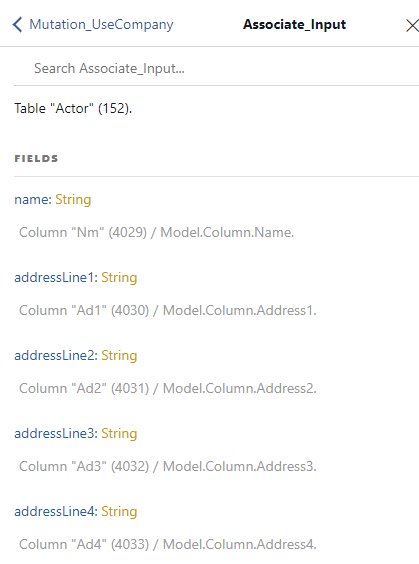
The input types for the values argument expose all the columns of the table, except for:
- the primary key column (which is automatically incremented)
- in-memory columns
- utility columns
createdDate(SQL nameCreDt),createdTime(SQL nameCreTm),createdByUser(SQL nameCreUsr),changedDate(SQL nameChDt),changedTime(SQL nameChTm), andchangedByUser(SQL nameChUsr), which are present in every table.
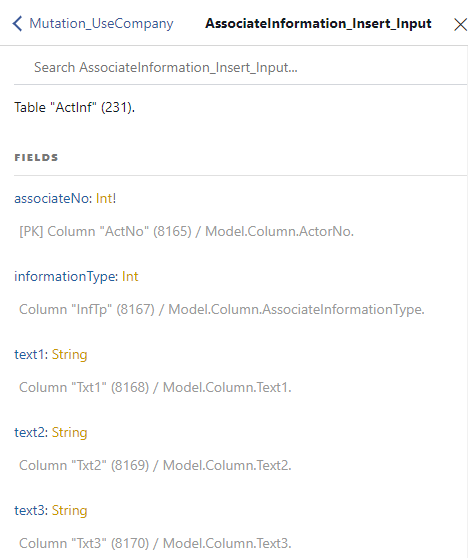
If a table has more than one column as primary keys, then all but the last of these primary key columns must be filled in. The last primary key column is automatically incremented but the others must be explicitly supplied. These are foreign keys to other tables and the records they point to must exist for the operation to succeed. In this case, the type name has the form <tablename>_Insert_Input.
The following image shows a snippet of the Associate_Input type from the GraphiQL document explorer:
Similarly, the next image shows a snippet of the AssociateInformation_Insert_Input, that has two primary key fields:
associateNois also a foreign key to theAssociatetable and must be supplied with an existing valuelineNois a primary key that is auto incremented, and, therefore, not present in the input type.
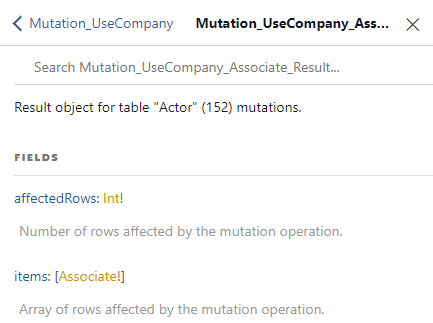
The mutation result type (<parenttype>_<tablename>_Result) has two fields:
affectedRowsindicated the number of rows successfully affected by the operation (in the case of inserts the number of records that were successfully inserted)itemsan array of objects affected by the mutation operation (for inserts, these are the records that were successfully inserted).
Here is a snippet of the Mutation_UseCompany_Associate_Result from the GraphiQL document explorer:
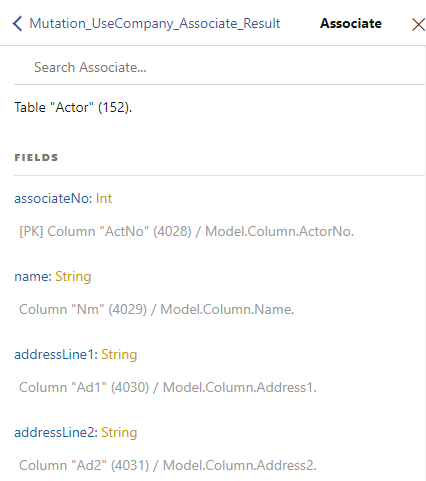
The objects in the items field have the same type that is used for query operations. For the Associate table, this is called Associate and looks like this:
An insert operation has the following form:
mutation insert($cid : Int!)
{
  useCompany(no: $cid)
  {
    associate_create(values:[
      {
        name:"Erik Larson",
        shortName :"Erik",
        customerNo: 30101
      },
      {
        name :"Frida Olson",
        shortName:"Frida",
        customerNo: 30102
      }
    ])
    {
      affectedRows
      items
      {
        associateNo
        customerNo
        name
        shortName
        languageNo
      }
    }
  }
}{
"data": {
"useCompany": {
"associate_create": {
"affectedRows": 2,
"items": [
{
"associateNo": 547,
"customerNo": 30101,
"name": "Erik Larson",
"shortName": "Erik",
"languageNo": 0
},
{
"associateNo": 548,
"customerNo": 30102,
"name": "Frida Olson",
"shortName": "Frida",
"languageNo": 0
}
]
}
}
}
}Fields order
The order of fields given in the values argument is important, because the fields are assigned in this user-given order. Listing the fields in some particular order may result in unexpected results (such as fields having default values).
Here is an example when creating an order. When customerNo is given before dueDate, the results are as expected:
mutation create_order($cid : Int!)
{
   useCompany(no : $cid)
   {
      order_create(
         values:[
           {
             customerNo : 10000
             dueDate: 20221124
           }
         ]
      )
      {
        affectedRows
        items
        {
          orderNo
          dueDate
        }
      }
   }
}{
"data": {
"useCompany": {
"order_create": {
"affectedRows": 1,
"items": [
{
"orderNo": 6,
"dueDate": 20221124,
}
]
}
}
}
}However, if the dueDate is specified before customerNo, then the dueDate is not set:
mutation create_order($cid : Int!)
{
   useCompany(no : $cid)
   {
      order_create(
         values:[
           {
             dueDate: 20221124
             customerNo : 10000
           }
         ]
      )
      {
        affectedRows
        items
        {
          orderNo
          dueDate
        }
      }
   }
}{
"data": {
"useCompany": {
"order_create": {
"affectedRows": 1,
"items": [
{
"orderNo": 6,
"dueDate": 0,
}
]
}
}
}
}Suggested values
When you create a new record, you can ask the system to automatically fill in values for numerical fields. The API for this has changed over time. The correct way of using this feature is to:
- specify the fields in the objects in the
valuesarray in their correct order (see the previous section on fields order) - specify the fields for which you want the system to automatically fill in the
suggestargument.
The argument suggest has an input type containing all the fields from the table for which the system can automatically fill in values.
Here is an example of the Suggest_Associate_Input type for the Associate table:
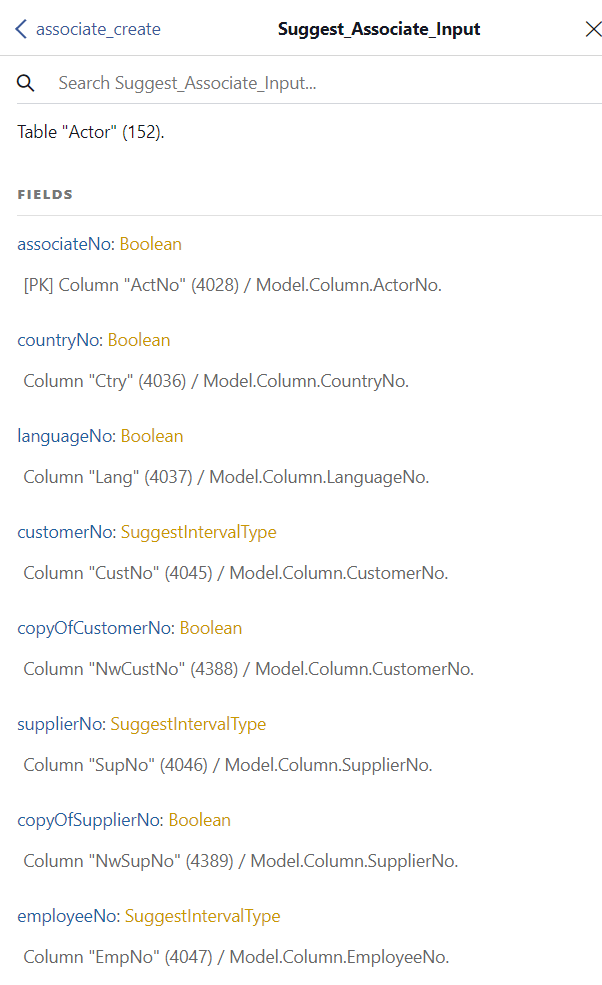
The field of all these input types are of one of the following two types:
Boolean, in which case you must use the valuetrueto include the column in the suggestions list.SuggestIntervalType, in which case you must specify afromandtovalue to bound the numeric interval for the value of the field.
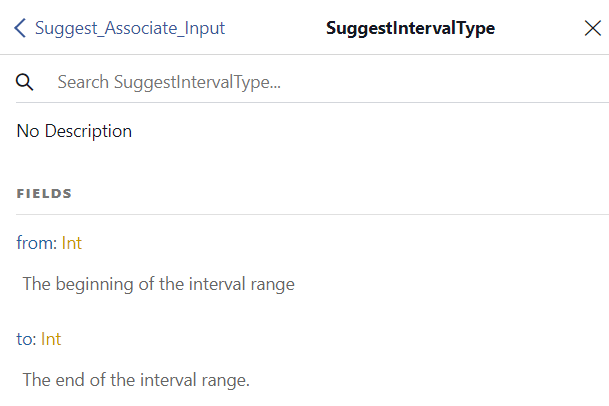
A limited number of fields in the data model support specifying an interval.
Here is an example for suggesting values:
mutation create_voucher($cid : Int!,
                        $bno : Int!,
                        $cno : Int!)
{
   useCompany(no : $cid)
   {
      voucher_create(
         values: [{
            batchNo : $bno
            voucherNo : 0
            voucherDate : 0
            valueDate : 0
            debitAccountNo : 1930
            creditAccountNo: $cno
            customerNo : $cno
            amountDomestic : 100
         }],
         suggest : {
          voucherNo : true,
          voucherDate : true
          valueDate : true
        }
      )
      {
         affectedRows
         items
         {
            batchNo
            voucherNo
            voucherDate
            valueDate
         }
      }
   }
}{
"data": {
"useCompany": {
"voucher_create": {
"affectedRows": 1,
"items": [
{
"batchNo": 2,
"voucherNo": 60003,
"voucherDate": 20220715,
"valueDate": 20220715
}
]
}
}
}
}The fields voucherNo, voucherDate, and valueDate are present both in the values object and in the suggest argument. However, the assignment value (in the above example 0) is ignored and the system automatically fills in the values for these fields.
The fields need to be present in both places because the assignments is performed in the order given in the values object, but we also need to specify which fields should be automatically filled in by the system.
The order of fields in the suggest argument does not matter.
There are several fields in the data model that support suggesting an interval as a value. These fields are:
customerNo,suppliedNo, andexployeeNoinAssociatecapitalAssetNoinCapitalAssetresourceNoinResource
For these fields, you can specify the interval in two ways.
The first method is to use the suggest argument as before, providing an interval with from and to values for the field. Here is an example:
mutation create_customer($cid : Int!)
{
   useCompany(no : $cid)
   {
      associate_create(
         values: [{
            customerNo : 0
            name : "Test Customer
         }],
         suggest : {
            customerNo : {
               from : 10000
               to : 19999
            }
         }
      )
      {
         affectedRows
         items
         {
            associateNo
            customerNo
            name
         }
      }
   }
}{
"data": {
"useCompany": {
"associate_create": {
"affectedRows": 1,
"items": [
{
"associateNo": 187,
"customerNo": 10928,
"name": "Test Customer",
}
]
}
}
}
}This will ignore the value 0 specified in the values object and automatically assign a value in the given interval, 10000 - 19999.
The second method is to use the companion _suggest_interval field. These special fields are of the type SuggestIntervalType that has a from and to field to define the bounds of the interval.
For instance, for the customerNo field in the Associate table, a customerNo_suggest_interval field is available. This is shown in the following example:
mutation CreateAssociate($cid : Int)
{
  useCompany(no :$cid)
  {
    associate_create(values:[{
      name : "Demo Customer AS",
      customerNo_suggest_interval : {
         from : 10000,
         to : 20000
      },
      countryNo : 47,
      currencyNo : null
    }])
    {
      affectedRows
      items
      {
        associateNo
        customerNo
      }
    }
  }
}{
"data": {
"useCompany": {
"associate_create": {
"affectedRows": 1,
"items": [
{
"associateNo": 1234,
"customerNo": 15726
}
]
}
}
}
}Notice that in this case the suggest argument is not needed at all.
The rules of thumb for providing inputs are as follows:
- fields must be specified in the correct order
- if a field should have a specific value, provide it as an input
- if a field should remain unassigned, do not list it in the input
- if a field should have a system given value, specify any value but also include it in the
suggestargument - if a field can have a suggest value in a given interval and you want to specify the interval, use the
_suggest_intervalsuffixed field, such ascustomerNo_suggest_interval. If you do not want to specify the interval, use the same suggest solution as for the other fields.
Deprecated suggested values
Suggeting a value is also possible by specifying the null value for a field. This has the advantage that the suggest argument is not needed at all. However, it conflicts with the need to be possible to specify fields in variables for instance but with a null value. For this reason, although still supported, this method is deprecated and should be avoided.
Here is an example of suggesting values for voucherNo and voucherDate by specifying null for these fields:
mutation create_voucher($cid: Int, $batchId: Int!)
{
   useCompany(no: $cid)
   {
      voucher_create(values: [
         {
            batchNo: $batchId
            voucherNo : null
            voucherDate: null
            amountDomestic: 1300
            creditAccountType: 2
            creditAccountNo: 50000
         },
         {
            batchNo: $batchId
            voucherNo : null
            voucherDate: null
            amountDomestic: 600
            debitAccountType: 3
            debitAccountNo: 4300
         },
         {
            batchNo: $batchId
            voucherNo : null
            voucherDate: null
            amountDomestic: 700
            debitAccountType: 3
            debitAccountNo: 1930
         }])
      {
         affectedRows
         items
         {
            batchNo
            voucherNo
            voucherDate
            debitAccountNo
            creditAccountNo
            amountDomestic
         }
      }
   }
}{
"data": {
"useCompany": {
"voucher_create": {
"affectedRows": 3,
"items": [
{
"batchNo": 10002,
"voucherNo": 60002,
"voucherDate": 20220101,
"debitAccountNo": 0,
"creditAccountNo": 50000,
"amountDomestic": 1300
},
{
"batchNo": 10002,
"voucherNo": 60002,
"voucherDate": 20220101,
"debitAccountNo": 4300,
"creditAccountNo": 0,
"amountDomestic": 600
},
{
"batchNo": 10002,
"voucherNo": 60002,
"voucherDate": 20220101,
"debitAccountNo": 1930,
"creditAccountNo": 0,
"amountDomestic": 700
}
]
}
}
}
}The downside of this is that fields that are not supposed to be assigned should not be specified at all. Passing null for their value results in them being automatically filled in by the system (provided that it’s possible). Here is an example:
mutation create_customers(
    $cid: Int!,
    $customers: [Associate_Input!]!) {
  useCompany(no: $cid) {
    associate_create(
      values: $customers
      suggest: {
        customerNo: {
          from: 65000
          to: 69999
        }
      }
    ) {
      affectedRows
      items {
        associateNo
        name
        customerNo
        companyNo
      }
    }
  }
}{
"cid": 12345678,
"customers": [
{
"name": "Test Company AS",
"companyNo": null,
"addressLine1": "GraphQL gate 44",
"addressLine2": "",
"postCode": "0110",
"postalArea": "Oslo",
"countryNo": 0,
"emailAddress": ""
}
}In this example, the field companyNo is assigned the value null. Which means, the system will automatically assign a value to it. In order to avoid that, leave the field out of the input at all.
Assigning fields from unset variables
When fields are assigned from variables, but the variables are not set, the fields are ignored as they were not provided in insert and update operations.
For instance, consider the following query:
mutation update_c_ompany(
    $companyID: Int!
    $customerNo: Int!,
    $phone: String,
    $mobilePhone: String,
    $privatePhone: String,
)
{
   useCompany(no: $companyID)
   {
      associate_update(
         filter:
         {
            customerNo: {_eq: $customerNo }
         },
         value:
         {
            phone: $phone
            mobilePhone: $mobilePhone
            privatePhone: $privatePhone
         }
      )
      {
        affectedRows
      }
   }
}{
"companyID" : 1234567,
"customerNo": 11000,
"phone": "9411223344"
}The $mobilePhone and $privatePhone are not set in the variables dictionary. Therefore, the query becomes equivalent to the following:
mutation update_c_ompany(
    $companyID: Int!
    $customerNo: Int!,
    $phone: String
)
{
   useCompany(no: $companyID)
   {
      associate_update(
         filter:
         {
            customerNo: { _eq: $customerNo }
         },
         value:
         {
            phone: $phone
         }
      )
      {
        affectedRows
      }
   }
}
Insert between existing records
It is possible to insert new records between existing ones. This is done by using the insertAtRow and insertPosition optional arguments for the <tablename>_create fields.
The insertAtRow argument defines a filter for indetifying the position where the new records should be inserted. This filter is applied for every object in the values array. Although the filter can be anything, it should include the primary key at least partially. If more that one row matches the filter, the first one is considered the insertion point.
The insertPosition argument defines where the new records should be inserted in relation to the row identified by the insertAtRow filter. The possible values are BEFORE and AFTER. This argument is optional and if missing, the default value is BEFORE.
The objects in the values array should not assign values to the primary key fields. These are automatically assigned by the system from the values of the record matching the insertAtRow argument.
mutation insert_order_line($cid : Int!,
                           $ono : Int!,
                           $pno3 : String)
{
  useCompany(no : $cid)
  {
    orderLine_create(values:[
      {
        productNo : $pno3,
        quantity : 1
      }
    ],
    insertAtRow: { _and : [
      {orderNo : {_eq : $ono}},
      {lineNo : {_eq : 1}},
    ]},
    insertPosition : AFTER)
    {
      affectedRows
      items
      {
        orderNo
        lineNo
        sortSequenceNo
        productNo
        quantity
      }
    }
  }
}{
"data": {
"useCompany": {
"orderLine_create": {
"affectedRows": 1,
"items": [
{
"orderNo": 2024,
"lineNo": 3,
"sortSequenceNo": 2,
"productNo": "PRO-01",
"quantity": 1
}
]
}
}
}
}To understand how this works, let’s consider the following example of inserting new order lines between existing ones for a particular order. Let’s start with the following data for the OrderLine table:
| OrderNo | LineNo | SortSequenceNo | ProductNo |
|---|---|---|---|
| 2024 | 1 | 1 | PRO-01 |
| 2024 | 2 | 2 | PRO-02 |
If we insert a new line with product number PRO-03 before the line with the primary key OrderNo=2024, LineNo=1, the result will be:
| OrderNo | LineNo | SortSequenceNo | ProductNo |
|---|---|---|---|
| 2024 | 1 | 2 | PRO-01 |
| 2024 | 2 | 3 | PRO-02 |
| 2024 | 3 | 1 | PRO-03 |
However, if we insert the same line but after the one with the primary key OrderNo=2024, LineNo=1, the result will be:
| OrderNo | LineNo | SortSequenceNo | ProductNo |
|---|---|---|---|
| 2024 | 1 | 1 | PRO-01 |
| 2024 | 2 | 3 | PRO-02 |
| 2024 | 3 | 2 | PRO-03 |
On the other hand, if we insert two order lines at the same time, one for product PRO-03 and one for product PRO-04, the result will be the following when inserting before the record with the primary key OrderNo=2024, LineNo=1:
| OrderNo | LineNo | SortSequenceNo | ProductNo |
|---|---|---|---|
| 2024 | 1 | 3 | PRO-01 |
| 2024 | 2 | 4 | PRO-02 |
| 2024 | 3 | 1 | PRO-03 |
| 2024 | 4 | 2 | PRO-04 |
Similarly, if the insertion occurs after, the result will be:
| OrderNo | LineNo | SortSequenceNo | ProductNo |
|---|---|---|---|
| 2024 | 1 | 1 | PRO-01 |
| 2024 | 2 | 4 | PRO-02 |
| 2024 | 3 | 3 | PRO-03 |
| 2024 | 4 | 2 | PRO-04 |
This is because the insertion point is determined each time a new record is inserted (and not just once for all records in a create operation).
Inserting head and line rows
The data model defines several head and line tables. It is possible to insert both the head row and the lines with a single mutation operation for:
OrderandOrderLineBatchandVoucher
The following example shows how to create two orders, the first one with two lines and the second one with a single line:
mutation create_order_and_lines($cid : Int!,
                                $customer : Int,
                                $prod1 : String,
                                $prod2 : String)
{
   useCompany(no : $cid)
   {
      order_create(values:[
         {
            customerNo : $customer,
            orderLines : [
               { productNo : $prod1, quantity : 1 },
               { productNo : $prod2, quantity : 2 },
            ]
         },
         {
            customerNo : $customer,
            orderLines : [
               { productNo : $prod1, quantity : 1 }
            ]
         }]
      )
      {
         affectedRows
         items
         {
            orderNo
            customerNo

            orderLines: joindown_OrderLine_via_Order
            {
               items
               {
                  orderNo
                  lineNo

                  productNo
                  quantity
                  priceInCurrency
               }
            }
         }
      }
   }
}
Although the orderNo field is avaiable for the orderLines input objects, it should not be specified because it is automatically assigned by the system (from the parent order).
Temporary rows
In some cases, it is useful to create temporary rows. A typical example is for determining the customer price for a product. There is no specific API for fetching customer prices, but it is possible by creating an order, with an order line for the product and customer in question, and then fetching the price from the order line. After this operation, the order should be deteled. To avoid creating table rows and deleting them afterwards, it is possible to create temporary rows, that are only stored in memory and that are automatically deleted at the end of the execution of the request, without being preserved (even for a short time) into the database.
Temporary rows are created by specifying true for the optional temporary argument, available in all _create fields.
mutation get_customer_price($cid : Int!, $customer : Int, $prod : String)
{
   useCompany(no : $cid)
   {
      order_create(
         values:[
            {
               customerNo : $customer,
               orderLines : [
                  { productNo : $prod, quantity : 1 },
               ]
            }
         ],
         temporary : true
      )
      {
         affectedRows
         items
         {
            orderNo
            customerNo

            orderLines: joindown_OrderLine_via_Order
            {
               items
               {
                  orderNo
                  lineNo

                  productNo
                  quantity
                  priceInCurrency
               }
            }
         }
      }
   }
}
When creating temporary records, the primary keys are assigned negative values. These values are irrelevant. If you retrieve back the values for the primary key fields, you will see they have negative values. Here is an example result for the previous query:
{
   "data": {
      "useCompany": {
         "order_create": {
            "affectedRows": 1,
            "items": [
               {
                  "orderNo": -2147483648,
                  "customerNo": 10001,
                  "orderLines": {
                     "items": [
                        {
                           "orderNo": -2147483648,
                           "lineNo": -2147483648,
                           "productNo": "1001",
                           "quantity": 1,
                           "priceInCurrency": 995
                        }
                     ]
                  }
               }
            ]
         }
      }
   }
}